How to Start Affiliate Advertising on YouTube Without 1,000 Subscribers
You have 247 subscribers. Your videos get a few hundred views each. You are nowhere near the 1,000 subscribers and 4,000 watch hours needed for YouTube's Partner Program.
But you can start making money today.
According to TubeBuddy, creators can start affiliate marketing without meeting the 1,000 subscribers or 4,000 hours required for the YouTube Partner Program. While ad revenue waits behind a threshold, affiliate advertising opens immediately. You recommend products, viewers buy through your links, and you earn commissions.
This guide walks you through the entire process: choosing programs, placing links, creating content that converts, and building income before you ever see your first AdSense payment.
Why Affiliate Advertising Works for Small Channels
YouTube is one of the world's largest search engines. According to Shopify, people use it to research products before buying, making it ideal for affiliate content. Someone searching "best budget microphone 2024" is already in buying mode. They want recommendations. They want to see products in action.
Your small channel has advantages here. Viewers trust creators who feel accessible. A 10,000-subscriber channel reviewing cameras might seem sponsored or biased. A 300-subscriber channel sharing genuine first impressions feels more honest.
Advanced Ads notes that countless YouTubers upload unboxing and gadget review videos without leveraging affiliate links, missing out on potential earnings. If you are already making product content, you are leaving money on the table.
The math works at any size. If 200 people watch your video and 10 click your affiliate link, and 2 buy, you might earn $5 to $50 depending on the product and commission rate. That adds up across multiple videos. Some programs pay recurring commissions. According to TubeBuddy, some recurring subscription affiliate programs pay creators for as long as the referred customer remains active, potentially years of passive income from a single video.
Choosing Your First Affiliate Programs
Not all programs pay the same. Not all fit your content.
High Volume, Low Commission: Amazon Associates
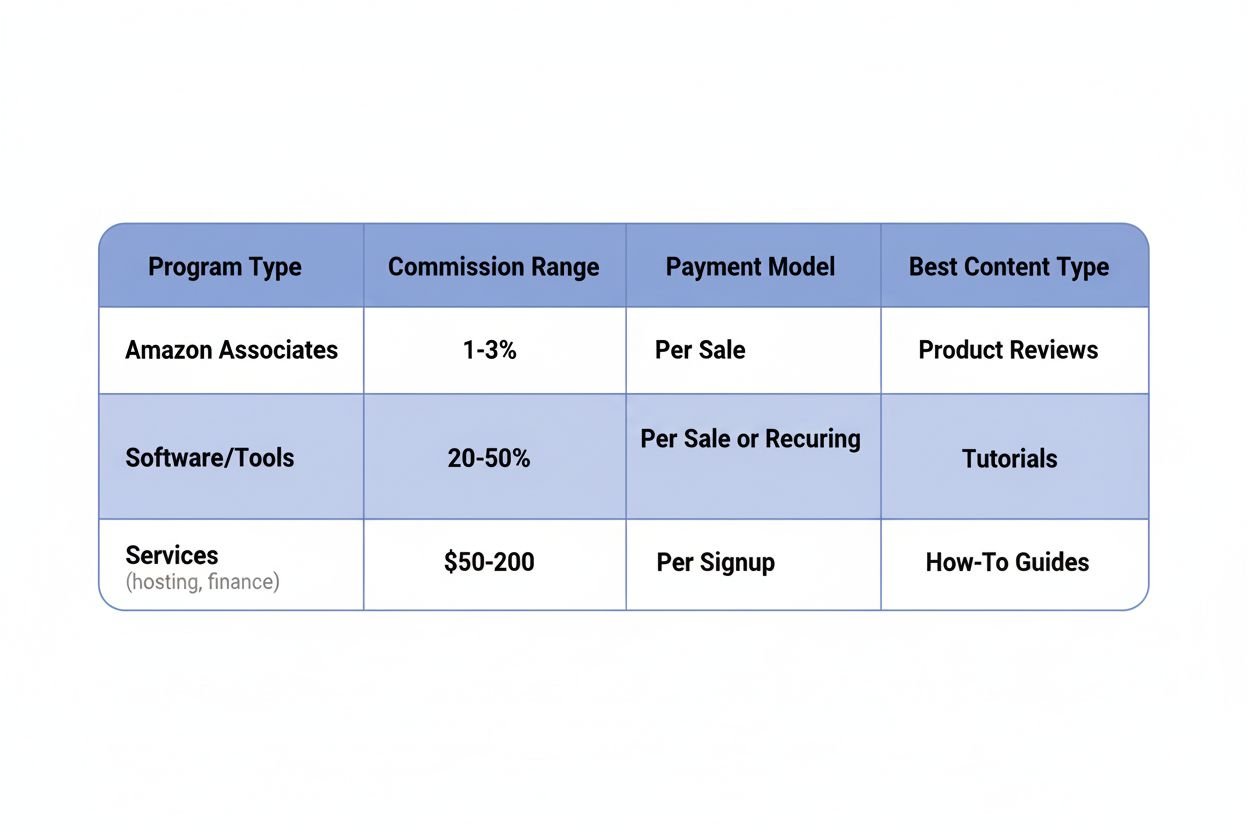
Amazon's affiliate program is the easiest to start with. You can link to almost any product. The downside: commissions are low. According to TubeBuddy, Amazon's affiliate program offers commissions of around 1% to 3%.
If someone buys a $50 item through your link, you earn $0.50 to $1.50. You need volume to make this worthwhile. But Amazon has one advantage: people already trust it and have accounts. The friction to purchase is low.
Best for: tech reviews, home goods, books, general product roundups.
High Commission, Niche Focus: Specialized Programs
Many companies run their own affiliate programs with better rates. Advanced Ads reports that commission rates on YouTube affiliate programs typically range from 5% to 20%, but can sometimes reach 50%.
Examples:
- Software and tools often pay 20% to 50% because they have high margins
- Online courses and education products frequently offer 30% to 40%
- Web hosting companies pay $50 to $200 per signup
- Financial products (credit cards, investment apps) can pay $10 to $100 per qualified lead
According to TubeBuddy, some YouTube-specific programs like TubeBuddy offer up to 30%.
Best for: tutorial content, software reviews, educational channels.
Where to Find Programs
Start with products you already use and recommend:
- Visit the company website and look for "Affiliate Program" or "Partners" in the footer
- Search "[product name] affiliate program" in Google
- Join affiliate networks like ShareASale, CJ Affiliate, or Impact, which host hundreds of programs in one place
- Check if competitors in your niche mention affiliate programs in their video descriptions
Apply to 3 to 5 programs in your first month. You will learn which ones convert and which do not.
Creating Content That Converts
You can slap affiliate links in any video description. Most will get ignored. The content itself needs to drive clicks.
Product Review Videos
The simplest format. You bought something, you show it, you share your opinion.
Structure:
- Show the product in the first 5 seconds
- Explain who it is for (beginners, professionals, people on a budget)
- Demonstrate it in use
- Cover 2 to 3 positives and 1 to 2 negatives
- Compare it to alternatives if relevant
- End with a clear recommendation
According to TubeBuddy, authenticity is key: dedicated content that naturally integrates products outperforms haphazardly inserted affiliate links.
Do not oversell. If the product has flaws, mention them. Viewers can smell dishonesty. One honest review builds more trust than ten promotional videos.
Unboxing Videos
Advanced Ads identifies unboxing formats as among the most effective for driving affiliate revenue.
People love unboxing videos because they simulate the experience of buying something new. The format works because:
- It captures the product at its most exciting moment
- Viewers see exactly what they will get
- First impressions feel genuine
Keep these tight. Show the packaging, reveal the contents, give initial reactions. Save the detailed review for a follow-up video. Link to both in descriptions.
Roundup and Comparison Videos
"5 Best Budget Laptops Under $500" or "Notion vs. Obsidian: Which Note App Should You Use?"
These perform well in search. Someone looking for "best budget laptop" is ready to buy. They want options, not a deep dive into one product.
Format:
- Introduce the criteria (price, features, use case)
- Cover 3 to 7 products
- Spend 1 to 2 minutes on each
- Rank them or assign them to different user types
- Link to all products in the description
According to Advanced Ads, roundup review videos are among the most effective for driving affiliate revenue.
Tutorial and How-To Videos
If you teach people how to do something, recommend tools along the way.
Example: "How to Start a Podcast" naturally includes microphones, recording software, and hosting platforms. Each is an affiliate opportunity.
The key is integration. Do not stop the tutorial to sell. Mention the tool when it is relevant: "I use Riverside.fm for recording because it captures separate audio tracks. Link in the description if you want to try it."
Avoid Misleading Tactics
Shopify warns that creators should avoid misleading headlines and clickbait when monetizing videos.
Bad examples:
- "This Product Changed My Life!" (when you used it once)
- Thumbnail showing a product you barely mention
- Claiming something is "the best" without testing alternatives
These tactics might get clicks, but they destroy trust. Viewers will not return. They will not click your links again.
Placing and Disclosing Affiliate Links
You have the content. Now you need to make the links easy to find and legally compliant.
Where to Put Links
Video description: This is the primary location. Put your most important affiliate link in the first two lines, before the "Show More" cutoff. Viewers should see it without clicking.
Format it clearly: "Get the [Product Name] here: [link]"
If you mention multiple products, list them with timestamps:
- 0:45 - Blue Yeti Microphone: [link]
- 2:30 - Boom Arm Stand: [link]
- 4:15 - Pop Filter: [link]
Pinned comment: Pin a comment with your main affiliate link. Some viewers read comments before descriptions.
In the video itself: Mention the link verbally. "I have left a link to this in the description below." Point to the bottom of the screen when you say it.
End screen: YouTube lets you add clickable elements in the last 5 to 20 seconds. You can link to another video, but not directly to affiliate links. Instead, link to a video dedicated to that product, which has the affiliate link in its description.
Required Disclosures
You must disclose affiliate relationships. This is not optional. The FTC requires it in the United States, and similar rules exist in most countries.
Add this to every video description with affiliate links: "This video contains affiliate links, which means I may earn a commission if you click through and make a purchase at no additional cost to you."
Place it near the top, not buried at the bottom. You can also mention it verbally in the video: "Quick note: some of the links below are affiliate links, which help support the channel."
This transparency builds trust. Viewers appreciate honesty.
Link Management Tools
If you promote products across multiple videos, use a link management tool:
- Bitly: Free, lets you create short, trackable links
- Pretty Links (WordPress plugin): Masks long affiliate URLs
- Genius Link: Automatically localizes Amazon links for international viewers
These tools also let you update links. If an affiliate program changes or a product goes out of stock, you can redirect the link without editing every video description.
Optimizing Videos for Search and Discovery
Advanced Ads points out that over 300 hours of video are uploaded to YouTube every minute, making exceptional content essential to attract viewers. You need people to find your videos.
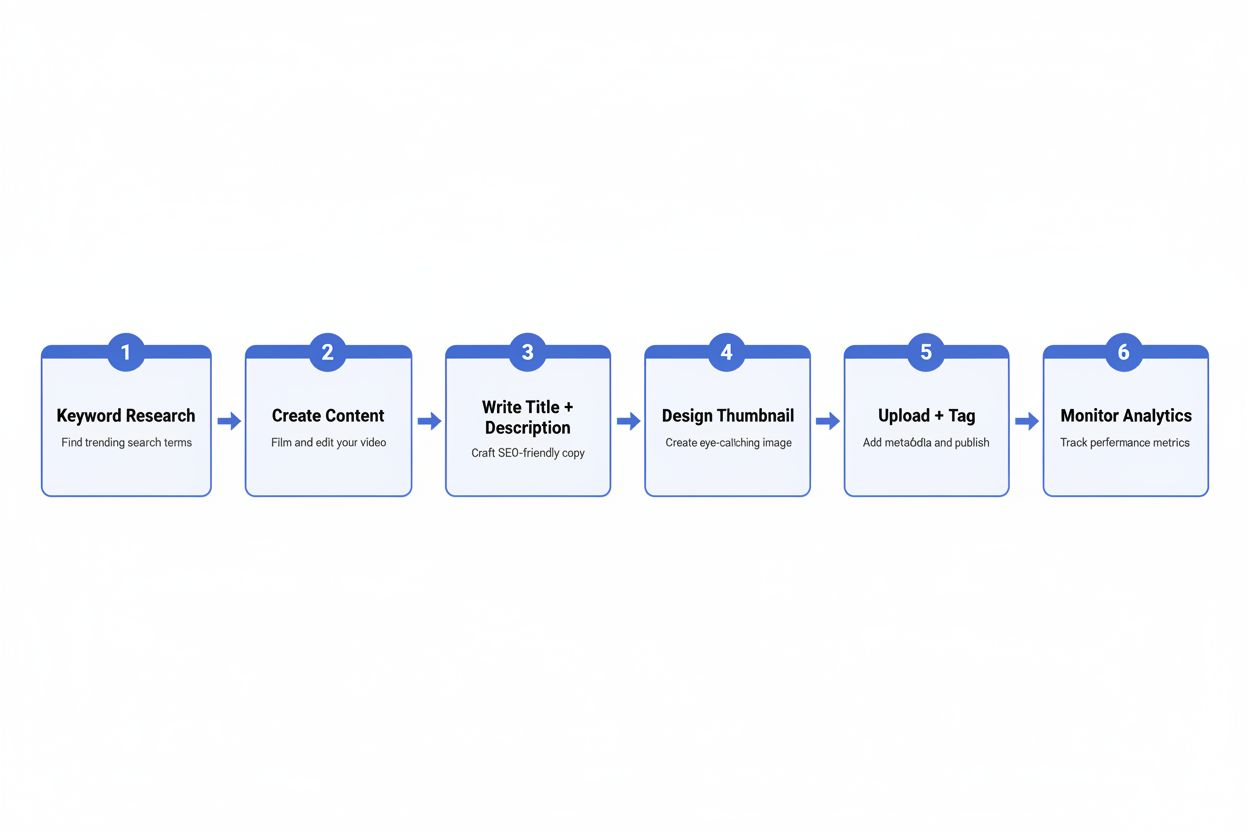
Keyword Research
Before filming, search YouTube for your topic. Look at:
- What videos already rank
- What titles they use
- How many views they get
- What questions appear in the comments
Use tools like TubeBuddy or VidIQ (both have free versions) to see search volume and competition for keywords.
Target "low competition, high intent" keywords. Instead of "best laptop" (too broad), try "best laptop for college students under $600" (specific, buyer intent).
Titles That Get Clicks
Your title needs to:
- Include your target keyword
- Promise a clear benefit or answer
- Be specific with numbers or timeframes
Good examples:
- "5 Budget Microphones I Tested Under $50 (Honest Review)"
- "Notion vs. Obsidian: I Used Both for 30 Days"
- "How to Edit Videos Faster: 7 Premiere Pro Shortcuts"
Bad examples:
- "My Thoughts on Microphones" (vague)
- "You NEED to See This Product!!!" (clickbait, no information)
Descriptions and Hashtags
According to Shopify, optimizing videos with relevant descriptions and hashtags increases chances of appearing in search results.
Write descriptions that:
- Repeat your main keyword in the first sentence
- Expand on what the video covers
- Include related keywords naturally
- Add timestamps for longer videos
Use 3 to 5 hashtags. The first three appear above your title. Choose hashtags that are:
- Relevant to your content
- Specific enough to have a community (#budgettech, not #tech)
- Searchable (check if others use them)
Thumbnails
Your thumbnail is the first thing people see. It needs to:
- Show the product clearly
- Use readable text (5 words or less)
- Have high contrast and bright colors
- Look good at small sizes (mobile screens)
Test different styles. Check your YouTube Studio analytics to see which thumbnails get higher click-through rates.
Tracking Performance and Improving Results
You published your first affiliate video. Now what?
Monitor Your Analytics
Check two dashboards:
YouTube Studio: Shows views, watch time, click-through rate, and audience retention. Look for:
- Which videos get the most views
- Where viewers drop off
- What traffic sources bring viewers (search, suggested, external)
Affiliate Dashboard: Each program has its own dashboard showing clicks, conversions, and earnings. Track:
- Which links get clicked
- Conversion rate (clicks to purchases)
- Which products earn the most
Compare the two. A video with 5,000 views but no affiliate clicks needs better calls to action. A video with 500 views and 50 clicks is working well.
Calculate Your Earnings Per View
Divide total affiliate earnings by total views across all videos. This gives you a baseline.
Example: You earned $120 from affiliate links last month. Your videos got 10,000 views total. That is $0.012 per view, or $12 per 1,000 views.
Now you can project: if you grow to 50,000 views per month, you can expect around $600 in affiliate income (assuming similar conversion rates).
Test and Iterate
Try different approaches:
- Change where you place links in descriptions
- Test different calls to action ("Link below" vs. "Check it out in the description")
- Experiment with video lengths (some products need 5 minutes, others need 15)
- Compare single product reviews to roundups
Give each test at least 3 to 5 videos before drawing conclusions. One video is not enough data.
Double Down on What Works
After 10 to 20 videos, patterns emerge. Maybe your unboxing videos get more clicks than tutorials. Maybe software reviews convert better than physical products.
Make more of what works. If "budget [product category]" videos perform well, create a series. If viewers respond to honest comparisons, make that your format.
Building Long-Term Affiliate Income
Affiliate advertising is not a quick win. It compounds over time.
Create Evergreen Content
Some videos stay relevant for years. "How to Choose a Microphone for YouTube" will get views in 2025, 2026, and beyond. These videos earn passive income long after you publish them.
Focus on:
- Fundamental how-to guides
- Product categories that do not change quickly
- Comparison videos for established products
- Beginner tutorials
Avoid:
- News and trends (they expire)
- Specific model reviews that will be replaced next year
- Time-sensitive content ("Best Products of 2024")
Update evergreen videos annually. Re-film sections if products change, or add a pinned comment with updated recommendations.
Build a Content Library
Each video is an asset. Ten videos with 500 views each generate more income than one video with 5,000 views because they target different keywords and audiences.
Publish consistently. One video per week is better than four in one week and then nothing for a month. YouTube's algorithm rewards regular uploads.
Grow Your Email List
YouTube owns your audience. If your channel gets deleted or the algorithm changes, you lose access.
Build an email list:
- Offer a free resource related to your content (checklist, template, guide)
- Mention it in videos and link to it in descriptions
- Use a simple tool like ConvertKit or Mailchimp (both have free tiers)
Email subscribers are people you can reach directly. You can recommend new videos, share affiliate products, and build a relationship outside YouTube's platform.
Expand to Other Platforms
Once you have a system on YouTube, replicate it elsewhere:
- Repurpose videos into blog posts with embedded videos and affiliate links
- Share clips on TikTok or Instagram Reels linking back to full videos
- Create a simple website with product recommendation pages
More platforms mean more traffic sources. If YouTube search slows down, Google search or social media can pick up the slack.
Common Mistakes to Avoid
Promoting Products You Have Not Used
Viewers can tell. Your enthusiasm feels fake. Your knowledge is shallow. You miss obvious flaws.
Only recommend products you have actually used or thoroughly researched. If you cannot afford to buy something, look for programs that send review units, or stick to products you already own.
Ignoring Your Niche
A gaming channel that suddenly reviews kitchen appliances confuses viewers. They subscribed for gaming content.
Stay within your niche, or at least adjacent to it. A tech channel can review productivity software. A fitness channel can review meal prep tools. But do not jump to unrelated categories just because the commission is high.
Overloading Videos with Links
Fifteen affiliate links in one video description overwhelms viewers. They do not know what to click.
Focus on 1 to 3 main products per video. If you mention more, prioritize the ones most relevant to the video's topic.
Neglecting Non-Affiliate Content
If every video is a product pitch, viewers will leave. They want value, not constant sales.
Follow a ratio: for every affiliate-focused video, create 2 to 3 videos that educate, entertain, or help without selling anything. This builds trust and keeps your channel from feeling like a commercial.
Giving Up Too Soon
Your first five videos might earn $2 total. That is normal.
Affiliate income grows slowly. It took most successful creators 6 to 12 months to see meaningful earnings. The difference between those who succeed and those who quit is persistence.
YouTube's Shopping Affiliate Program: What You Need to Know
YouTube has its own affiliate program, but it is not available to small channels yet.
According to Shopify, YouTube's own Shopping affiliate program requires at least 20,000 subscribers and YPP membership to join.
This program lets creators tag products directly in videos. Viewers see product cards and can buy without leaving YouTube. Commissions vary by product category.
For now, focus on third-party affiliate programs. When you hit 20,000 subscribers, YouTube Shopping becomes an additional income stream, not a replacement.
Your First 30 Days: A Practical Plan
Here is how to start:
Week 1: Setup
- Choose 2 to 3 affiliate programs and apply
- Get approved (most approve within 24 to 48 hours)
- Create accounts and generate your first affiliate links
Week 2: Content Creation
- Film 2 to 3 videos featuring products you already own
- Write descriptions with affiliate links and disclosures
- Design thumbnails and write optimized titles
Week 3: Publishing and Promotion
- Upload your videos
- Share them on any social media you use
- Engage with comments to boost early engagement
Week 4: Analysis
- Check YouTube Studio analytics
- Review affiliate dashboard for clicks and conversions
- Identify what worked and what did not
- Plan your next batch of content based on results
Repeat this cycle. Each month, you will improve.
What Happens When You Hit 1,000 Subscribers
Eventually, you will qualify for the YouTube Partner Program. When that happens, you will have two income streams:
Ad revenue: YouTube places ads on your videos. You earn based on views and ad engagement. Most creators earn $1 to $5 per 1,000 views from ads, depending on their niche.
Affiliate revenue: Continues as before, often earning more than ads for small channels.
The combination is powerful. A video with 10,000 views might earn $30 from ads and $150 from affiliate commissions. You have been building the affiliate side from day one, so when ads turn on, your income jumps immediately.
Many creators find that affiliate income exceeds ad revenue until they reach 50,000 to 100,000 subscribers. Some niches (tech, finance, software) see affiliate income dominate even at larger sizes.
Moving Forward
You do not need 1,000 subscribers to make money on YouTube. You do not need expensive equipment or a huge audience.
You need:
- Content that helps people make buying decisions
- Honest recommendations for products you trust
- Clear affiliate links and disclosures
- Consistency over weeks and months
Start with one video. Pick a product you own and like. Film a simple review. Add an affiliate link. Publish it.
Then make another.
The first dollar you earn from affiliate advertising proves the system works. The next hundred videos turn it into a reliable income stream.