AI-Powered Video Editing: Faster, Smarter, Better
The Editing Bottleneck Nobody Talks About
Most people who make videos spend more time editing than filming. A 10-minute YouTube video might represent 3 hours of raw footage, a full day of cutting, and another few hours of color grading, audio cleanup, and caption work. For solo creators, that ratio is brutal. For production teams, it is expensive.
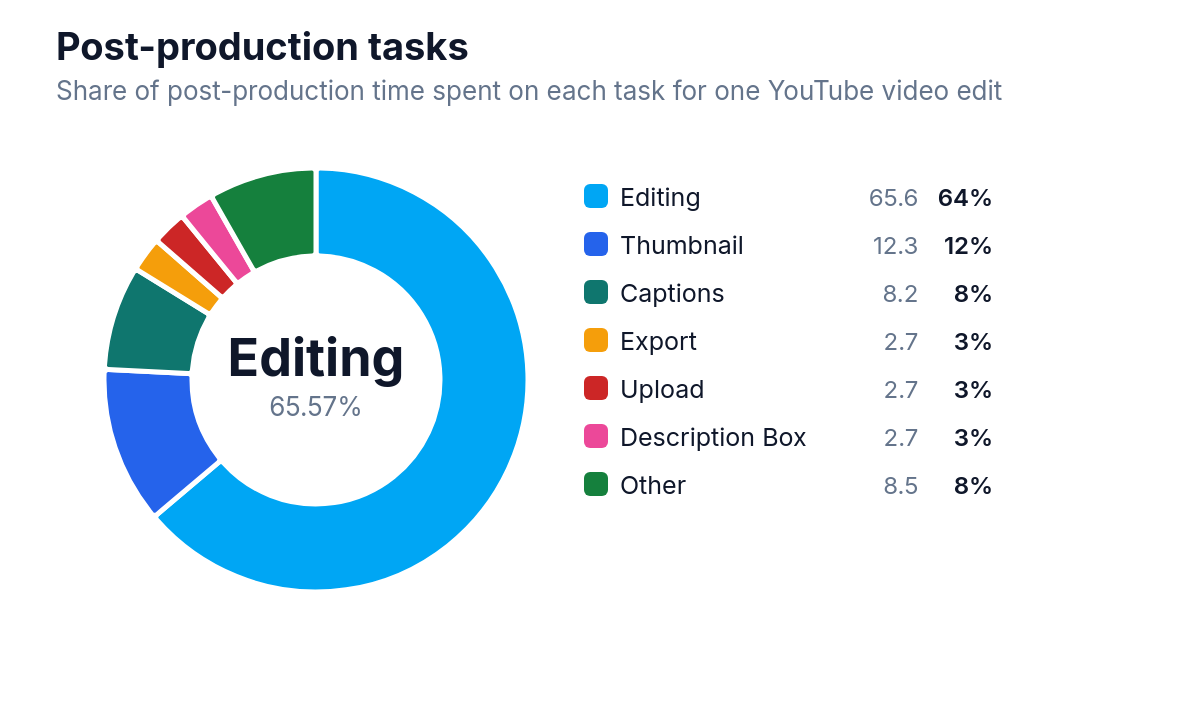
Editing takes 65.57% of post-production time for a typical YouTube video edit, more than any other single task.
AI-powered video editing tools have started to change that math. Not by replacing editors, but by handling the parts of the job that are repetitive, time-consuming, and frankly not where human creativity adds much value. Cutting silence, syncing audio to beats, generating captions, removing backgrounds, detecting scene changes - these tasks are now handled in seconds by software that would have seemed implausible five years ago.
This article covers what AI video editing actually does well, which tools are worth your time, and what the shift means for anyone who edits video professionally or as a creator.
What AI Actually Does in Video Editing
The phrase "AI video editing" gets applied to a wide range of features, some genuinely useful and some more marketing than substance. It helps to understand what is actually happening under the hood.
Automated Cutting and Silence Removal
This is where AI earns its keep most reliably. Tools like Descript and Premiere Pro's Speech to Text can transcribe your footage and let you edit video by editing text. Delete a sentence in the transcript, and the corresponding clip disappears from the timeline. For interview-heavy content, talking-head videos, or podcasts repurposed as video, text-based captions and transcripts can save minutes to hours for nearly any large-footage project.
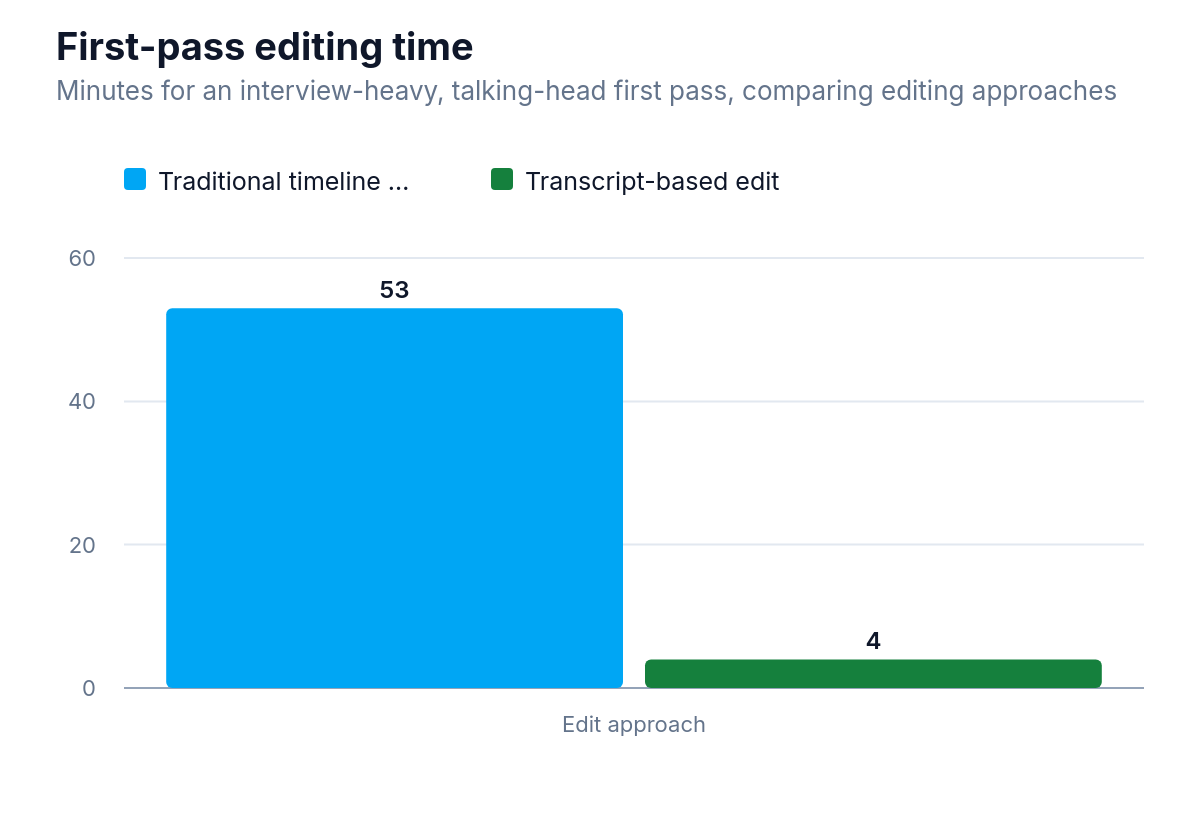
For interview-heavy talking-head footage, transcript-based editing cut first-pass editing time from 53 minutes to 4 minutes.
Silence removal is even simpler but just as valuable. AI detects pauses above a set threshold and removes them automatically. What used to require scrubbing through a timeline manually now takes about 30 seconds.
Scene Detection and Smart Trimming
AI can analyze footage and identify scene changes, camera cuts, and even the emotional quality of a shot. Some tools flag the "best" takes based on facial expression, sharpness, or audio quality. This is not perfect, but it gives editors a useful starting point rather than a blank timeline.
Captions and Subtitles
Automatic caption generation has improved dramatically. Modern AI transcription is accurate enough for most content without heavy manual correction, especially for clear speech in English. Tools like Captions, CapCut, and Adobe Premiere all offer this. For creators who need captions for accessibility or engagement, an internal Facebook study found that captions' impact on view time averages a 12% boost, which alone justifies the software cost for most short-form creators.
Background Removal and Visual Effects
Green screens used to be a prerequisite for clean background removal. AI-powered tools can now isolate subjects from complex backgrounds with reasonable accuracy, even from handheld footage shot in ordinary rooms. The results are not always broadcast-quality, but for social media content they are often good enough.
Audio Enhancement
Noise reduction, voice isolation, and even AI-generated music tracks are now standard features in many editing platforms. Adobe's AI audio tools can remove background noise, hum, and reverb from recorded speech. Runway and Descript can clean up audio that would previously have required a dedicated audio engineer.
The Tools Worth Knowing
There is no single best AI video editing tool because the right choice depends entirely on what you are making and how you work. Here is an honest breakdown of the main players.
Descript
Descript is built around the idea that editing video should feel like editing a document. You record or import footage, it transcribes everything, and you work from the transcript. It handles silence removal, filler word deletion ("um," "uh," "like"), and multi-track editing. It also has a feature called Overdub, which can generate a voice clone to fix small audio mistakes without re-recording.
It is best suited for podcasters, educators, and interview-based content. It is less useful for cinematic or heavily visual work where the audio transcript is not the primary editing guide.
Adobe Premiere Pro with AI Features
Adobe has integrated AI tools throughout Premiere Pro under the "Sensei" and more recently "Firefly" branding. These include automatic captions, speech-to-text editing, scene edit detection (useful for working with pre-edited footage), and AI-powered color matching. The Auto Reframe tool resizes footage for different aspect ratios automatically, which is genuinely useful for creators publishing across multiple platforms.
Premiere is still a professional-grade tool with a steep learning curve, but the AI features reduce the time spent on mechanical tasks considerably.
CapCut
CapCut has become the dominant tool for short-form video, particularly among TikTok and Instagram Reels creators. A MIDiA Q2 2024 survey found editor usage among beginner creators splits 26% for CapCut versus 24% for Adobe Premiere Pro. It is free, runs on mobile and desktop, and includes AI features like auto-captions, background removal, beat sync, and AI-generated B-roll suggestions. The interface is accessible enough that people with no editing background can produce polished content quickly.
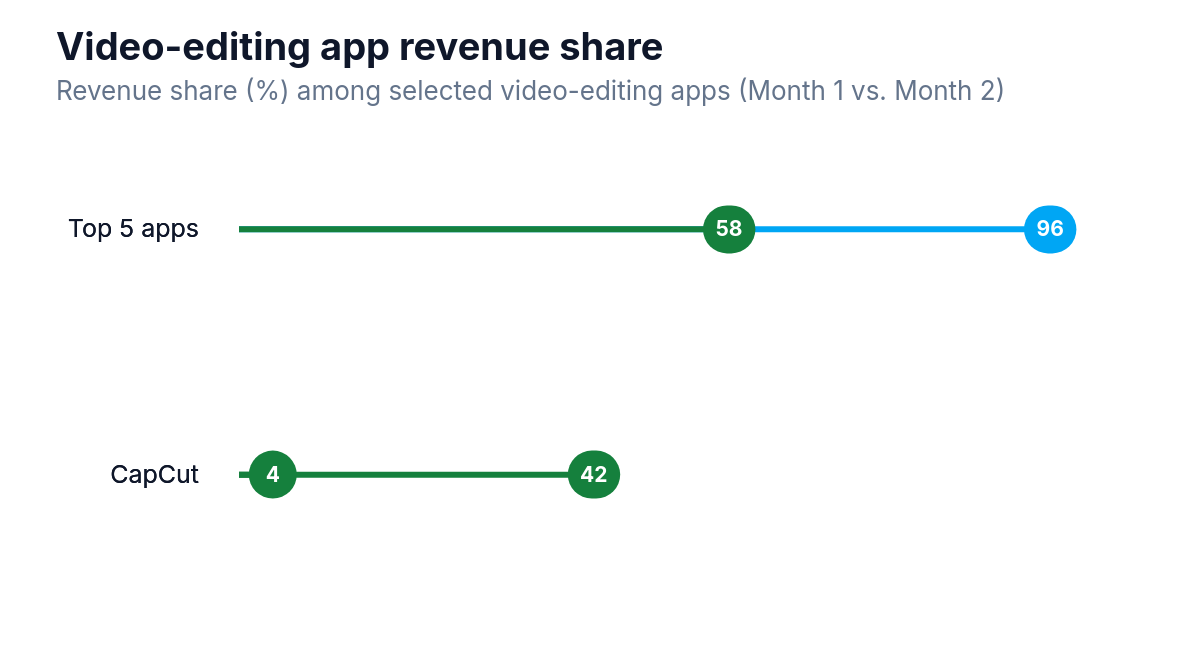
CapCut's revenue share rose from 4% to 42%, while the top five apps' combined share fell from 96% to 58%.
Its limitations show in longer or more complex projects, but for social media content it is hard to beat on value.
Runway
Runway sits at the more experimental end of the spectrum. It offers AI-generated video (text-to-video), background removal, motion tracking, and inpainting (removing objects from footage and filling in the background). It is used by filmmakers and visual artists who want to push what is possible rather than just speed up a standard workflow.
The text-to-video feature is genuinely impressive in short bursts but still struggles with consistency and realism over longer clips. It is a tool for creative experimentation more than production efficiency right now.
OpusClip and Vidyo.ai
These tools are designed specifically for one task: taking long-form video and automatically generating short clips for social media. They analyze content, identify the most engaging moments, add captions, and format clips for vertical or square aspect ratios. For podcasters and YouTubers who want to repurpose content without spending hours on it, they are practical and effective.
How YouTubers Actually Edit Quickly
The question of how successful YouTubers produce content so fast has a less mysterious answer than most people expect. The speed comes from a combination of workflow discipline, templates, and increasingly, AI tools.
Many high-volume creators use a tiered approach. They shoot with a consistent setup so footage is predictable and requires minimal color correction. They use templates for intros, outros, and lower thirds so those elements never need to be rebuilt from scratch. And they use AI tools to handle the first pass of editing - silence removal, rough cuts, captions - before a human editor (often a hired freelancer) does the creative work.
The AI does not replace the editor. It removes the parts of the job that do not require judgment, so the editor can focus on pacing, storytelling, and the decisions that actually make a video good.
For solo creators, the same logic applies. Using CapCut or Descript to handle mechanical tasks means more time for the work that matters: scripting, delivery, and the creative choices that build an audience.
What AI Still Cannot Do
Honest assessment matters here, because the marketing around AI video tools tends toward overstatement.
AI cannot make editorial judgments about what makes a video compelling. It can identify the loudest moment in a clip, but it cannot tell you whether that moment serves your story. It can remove silences, but it cannot recognize that a particular pause was intentional and meaningful. It can generate captions, but it will mishandle technical jargon, proper nouns, and accents with more frequency than a human transcriptionist would. Research into speech-to-text services' accuracy and speed finds that even paid services, which generally outperform open-source alternatives, remain dependent on the quality of the input audio.
AI-generated video (text-to-video tools like Runway Gen-2 or Sora) produces impressive results for short sequences, but as researchers have found, character consistency in text-to-video models breaks down across multiple scenes even when individual clips look strong. It is useful for abstract visuals, B-roll, and creative effects, not for replacing filmed footage in anything that requires realism.
Color grading at a high level still requires a human eye. Automated color matching tools are useful for consistency across clips, but the creative decisions that give a film its visual identity are not something current AI handles well.
The tools are genuinely useful. They are not magic.
Is Video Editing Still Worth Learning?
This question comes up a lot, and the answer is yes, with some caveats.
The skills that AI is replacing are the mechanical ones: cutting silence, syncing audio, generating captions. These were always the least interesting parts of editing. The skills that remain valuable are the ones AI cannot replicate: understanding pacing, building narrative tension, knowing when to cut and when to hold, choosing music that fits the emotional arc of a piece.
If you are learning video editing now, the smart approach is to learn the fundamentals of storytelling through editing rather than focusing on software mastery. Software changes. The principles of what makes a cut feel right do not.
For professional editors, AI tools are best understood as productivity multipliers. An editor who knows how to use these tools effectively can take on more projects, deliver faster, and compete at a higher level. An editor who ignores them will spend time on tasks that clients increasingly expect to be handled automatically.
The job is not disappearing. It is changing, as it has every time a major new tool arrived, from linear editing to non-linear systems, from tape to digital, from SD to HD. Each shift changed what editors spent their time on. This one is no different.
Getting Started Without Overcomplicating It
If you are new to AI video editing tools, the practical advice is to start with one tool and one workflow problem.
If your biggest time drain is captions, try CapCut or Descript for a project and see how much time you save. If you spend too long cutting silence from talking-head footage, try Descript's silence removal. If you need to repurpose long videos into short clips, try OpusClip on your next podcast episode.
The mistake most people make is trying to overhaul their entire workflow at once. AI tools work best when they slot into an existing process rather than replace it entirely. Find the bottleneck, apply the tool, measure the result, then move on to the next one.
The goal is not to use AI for its own sake. The goal is to spend more of your time on the parts of editing that actually require you.
The Practical Reality for Creators and Professionals
AI-powered video editing is not a future development. It is available now, it works, and it is being used by creators and production teams across every level of the industry. The tools are good enough that ignoring them is a competitive disadvantage.
At the same time, the gap between what AI can do and what skilled human editors do is still significant, and it matters most in the work that audiences actually respond to. The videos that build loyal audiences are not the ones with the fastest turnaround. They are the ones with the best storytelling, the sharpest pacing, and the clearest sense of purpose.
AI gets you to a rough cut faster. What you do with that rough cut is still entirely up to you.