How to Get Accepted Into the YouTube Partner Program in 2025: A Step-by-Step Breakdown
You've been uploading videos for months. Your subscriber count is climbing. Comments are rolling in. Now you're ready to turn your channel into a revenue stream.
The YouTube Partner Program (YPP) is the gateway to earning money from your content. But the application process has specific requirements, and YouTube's policies have shifted dramatically in 2025. This guide breaks down both tiers of the program, the exact thresholds you need to hit, and how to navigate the application without delays or rejections.
Understanding the Two-Tier Structure of YPP
YouTube restructured its Partner Program to give creators earlier access to monetization features. Instead of one high barrier to entry, the program now has two distinct tiers.
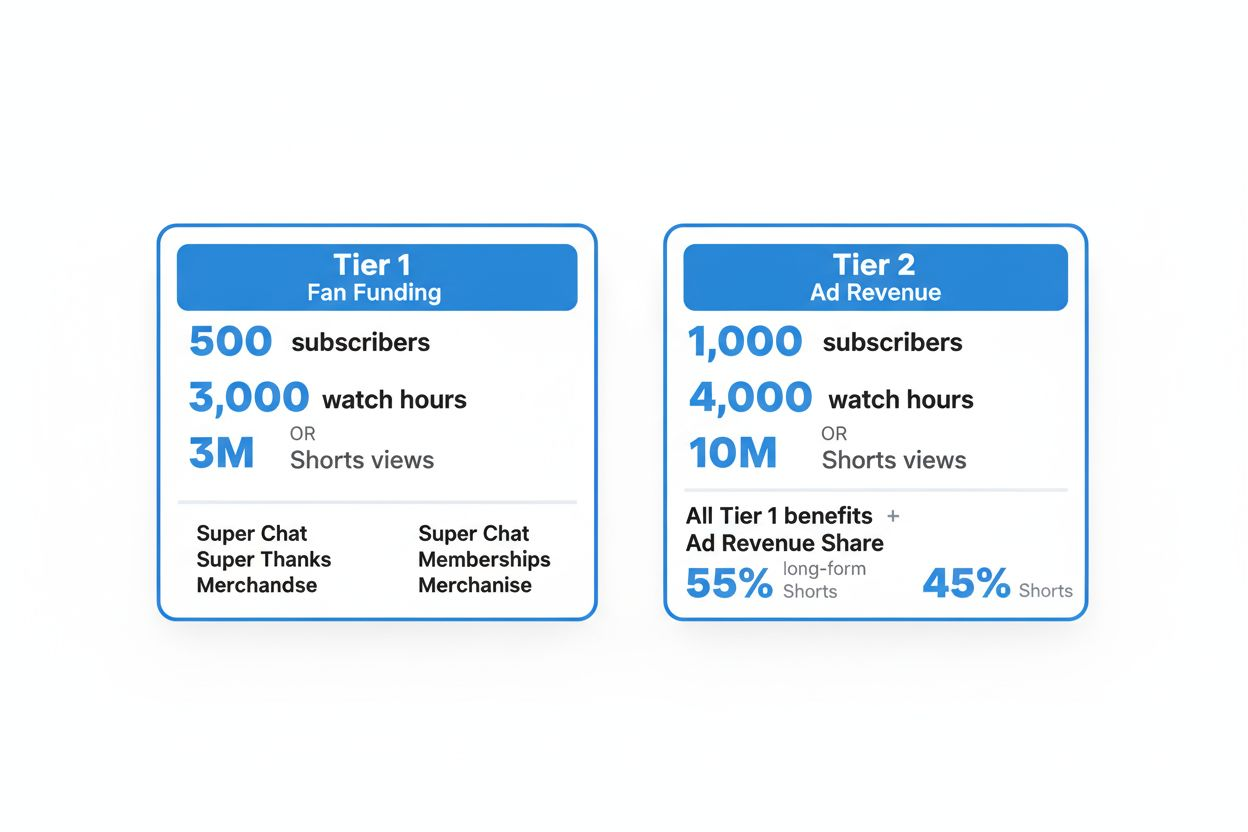
According to the YouTube Blog, Tier 1 unlocks fan funding tools once you reach 500 subscribers and either 3,000 watch hours or 3 million Shorts views. This tier gives you access to Super Chat, Super Thanks, channel memberships, and merchandise shelf integration. You're not earning ad revenue yet, but you can generate income directly from your audience.
Tier 2 is where ad revenue begins. You need 1,000 subscribers and either 4,000 watch hours in the past 12 months or 10 million Shorts views in the past 90 days. Once accepted into Tier 2, YouTube places ads on your videos and you earn a 55% revenue share on long-form content and 45% on Shorts.
The two-tier system means you can start monetizing sooner, even if you haven't hit the full ad revenue threshold. If your audience is highly engaged, fan funding can generate meaningful income while you work toward Tier 2.
Tier 1: Getting Started with Fan Funding
Tier 1 is your first milestone. The requirements are lower, and the features you unlock can start generating income immediately if your audience is willing to support you directly.
The Exact Numbers You Need
You need 500 subscribers. This is straightforward: 500 people must click the subscribe button on your channel.
For watch time, you have two paths. The first is 3,000 watch hours in the past 12 months. This applies to long-form videos (anything over 60 seconds). YouTube counts every minute viewers spend watching your content, whether they finish the video or not.
The second path is 3 million Shorts views in the past 90 days. Shorts are vertical videos under 60 seconds. If your content performs better in short-form, this route can be faster. Three million views sounds high, but Shorts can accumulate views quickly if they hit the algorithm right.
You cannot combine watch hours and Shorts views to reach Tier 1. You must meet one threshold or the other.
What You Can Do with Tier 1
Once accepted, you gain access to four monetization tools.
Super Chat lets viewers pay to highlight their messages during live streams. Messages appear in a colored block at the top of the chat, making them more visible. Prices range from $1 to $500, and you keep the majority after YouTube's cut.
Super Thanks allows viewers to buy a one-time animated comment on any of your videos. It's similar to a tip jar. The viewer's comment gets highlighted, and you receive a notification.
Channel memberships let subscribers pay a monthly fee for perks you define. Common perks include custom badges, exclusive posts, members-only live streams, or early access to videos. You set the price and the benefits.
The merchandise shelf integrates with approved merchandise partners. You can display up to 12 products directly below your videos. Viewers can browse and buy without leaving YouTube.
These tools work best if you have an engaged audience. A channel with 500 highly active subscribers can earn more from fan funding than a channel with 5,000 passive viewers.
Tier 2: Unlocking Ad Revenue
Tier 2 is where most creators aim. Ad revenue scales with views, so once you're in, your earning potential grows with your channel.
The Exact Numbers You Need
You need 1,000 subscribers. This is double the Tier 1 requirement.
For watch time, you need 4,000 watch hours in the past 12 months. This is cumulative across all your long-form videos. If you upload consistently, older videos continue contributing to your total as long as they're being watched.
Alternatively, you can reach 10 million Shorts views in the past 90 days. This is more than three times the Tier 1 Shorts threshold, but it's still achievable if your Shorts gain traction.
Again, you cannot combine watch hours and Shorts views. Pick the path that fits your content style.
How Ad Revenue Works
Once you're in Tier 2, YouTube places ads on your videos. You earn a 55% revenue share on long-form videos and 45% on Shorts, according to the YouTube Blog.
Your earnings depend on CPM (cost per thousand impressions), which varies by niche, audience location, and advertiser demand. Finance and tech channels often see higher CPMs than entertainment or gaming channels. Viewers in the US, Canada, and UK generate more ad revenue than viewers in other regions because advertisers pay more to reach those audiences.
Ad revenue is paid monthly through Google AdSense. You need to link an AdSense account and reach a $100 threshold before YouTube sends a payment.

The Application Process: Step by Step
Once you meet the requirements for either tier, you can apply. The process is the same for both.
Step 1: Check Your Eligibility in YouTube Studio
Go to YouTube Studio and click on "Monetization" in the left sidebar. YouTube will show your progress toward each threshold. If you've met the requirements, you'll see a green checkmark and an option to apply.
If you haven't met the requirements yet, YouTube displays your current stats and how much further you need to go. This section updates in real time as you gain subscribers and watch hours.
Step 2: Accept the YouTube Partner Program Terms
Click "Start" under the application section. YouTube will present the Partner Program terms. Read them. You're agreeing to follow YouTube's monetization policies, which include rules about content, copyright, and community guidelines.
If you violate these policies after being accepted, YouTube can suspend or remove your monetization. Accepting the terms without understanding them is a common mistake.
Step 3: Sign Up for Google AdSense
If you don't already have an AdSense account, you'll need to create one. AdSense is how YouTube pays you. The setup process requires your legal name, address, and tax information.
If you already have an AdSense account linked to a blog or website, you can use the same account for YouTube. You don't need a separate one.
YouTube will ask you to link your AdSense account to your channel. Follow the prompts. This step can take a few minutes, and you may need to verify your identity.
Step 4: Wait for YouTube to Review Your Channel
Once you've completed the application, YouTube reviews your channel. This is not automatic. A human reviewer checks whether your content follows YouTube's policies.
The review typically takes about a month, but it can take longer if there's a backlog. YouTube does not provide status updates during the review. You'll receive an email when the review is complete.
What YouTube Looks for During Review
YouTube checks several things. First, they verify that your watch hours and subscriber count are legitimate. Buying subscribers or using view bots will result in rejection and potential channel termination.
Second, they review your content for policy violations. This includes checking for reused content, spam, misleading metadata, and violations of community guidelines. Even if your most recent videos are clean, older videos can cause rejection if they violate policies.
Third, they check for copyright strikes. If you have active copyright strikes on your channel, you cannot join YPP. You need to resolve those strikes before applying.
If You're Rejected
YouTube will send an email explaining why. Common reasons include reused content, spam, or policy violations. You can reapply after 30 days, but you need to fix the issues first.
If you're rejected for reused content, remove or private the offending videos. If you're rejected for spam, clean up your metadata and stop using clickbait tactics. If you're rejected for community guideline violations, review YouTube's policies and make sure your future content complies.
Reapplying without fixing the issues will result in another rejection.
Major Policy Changes in 2025: What You Need to Know
YouTube updated its monetization policies significantly in 2025, and these changes affect who can join YPP.
The Shift from Repetitious Content to Inauthentic Content
On July 15, 2025, YouTube replaced its "Repetitious content" policy with a new "Inauthentic content" policy, according to Lenostube. This change targets AI-driven and faceless channels that prioritize quantity over quality.
Under the old policy, YouTube flagged channels that uploaded the same type of content repeatedly without adding value. The new policy is broader. It targets content that feels automated, lacks human creativity, or exists solely to game the algorithm.
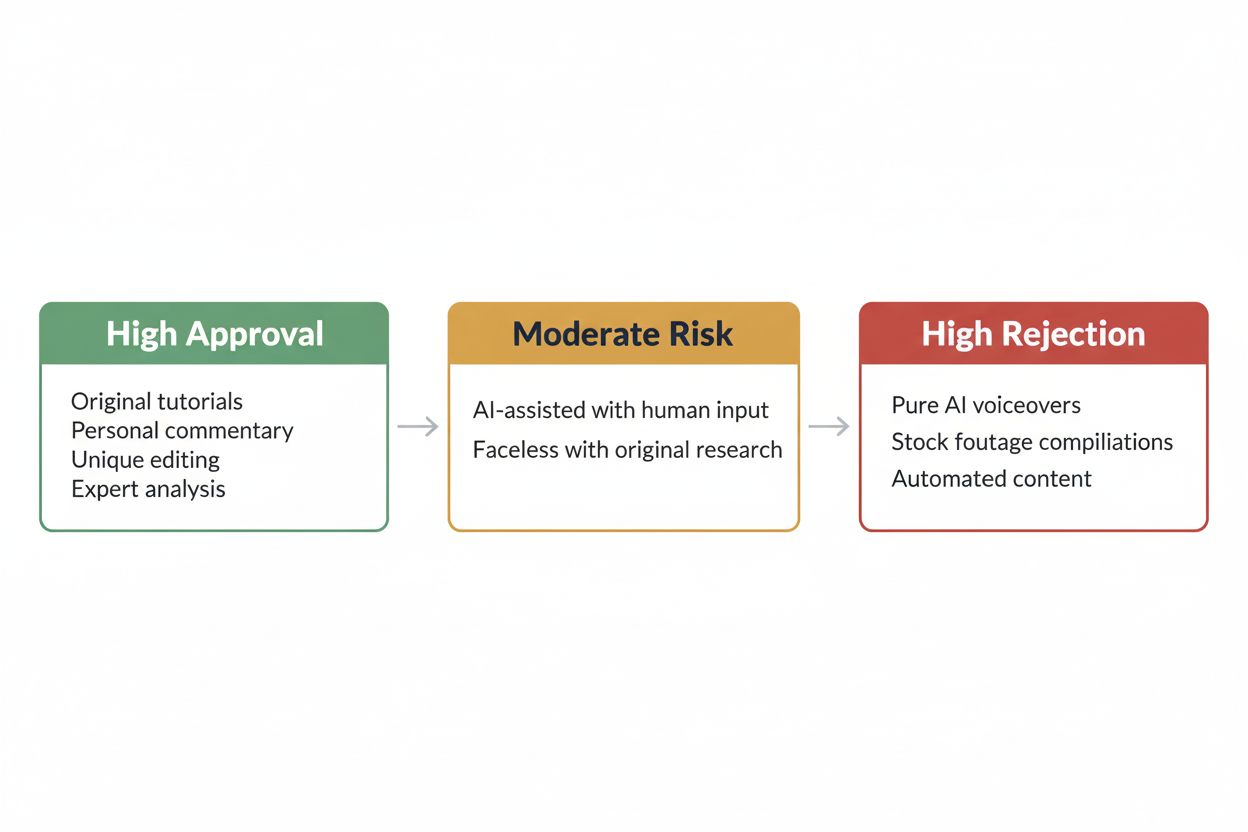
Faceless channels are not banned outright, but they face higher scrutiny. If your channel uses stock footage, AI voiceovers, and generic scripts without adding unique insight or creativity, YouTube may reject your application.
Channels that rely on AI tools to generate scripts, voiceovers, or visuals need to add clear human input. This could be original research, personal commentary, unique editing, or a distinct perspective. The key is demonstrating that a human is making creative decisions, not just feeding prompts into an AI tool.
What This Means for Your Content Strategy
If you're using AI tools, you need to be intentional about how you use them. AI can help with research, scripting, or editing, but the final product must reflect your unique voice and perspective.
Channels that succeed under the new policy are those where the creator's personality, expertise, or creativity is evident. Tutorial channels, commentary channels, and educational channels that provide original analysis tend to pass review. Channels that aggregate content from other sources without adding value tend to get rejected.
Activity Requirements: Staying Monetized After Acceptance
Getting into YPP is one thing. Staying in requires ongoing activity.
According to Fundmates, YouTube enforces strict activity requirements. After 30 days without uploads, your channel receives an automated warning. After 60 days, you lose access to Super Chat, memberships, and merchandise integration. After 90 days of complete inactivity, YouTube may suspend your monetization entirely and require you to reapply to YPP.
These rules exist to keep the platform active and prevent dormant channels from holding monetization slots. If you're planning a break, you need to either upload something or risk losing your monetization.
How to Maintain Activity
You don't need to upload daily. One video per month is enough to avoid the 30-day warning. If you're going on hiatus, consider scheduling videos in advance or uploading Shorts, which require less production time.
If you lose monetization due to inactivity, you'll need to reapply. Your subscriber count and watch hours don't reset, but you'll go through the review process again. This can take another month, during which you're not earning ad revenue.
Common Mistakes That Delay or Prevent Acceptance
Many creators meet the thresholds but still get rejected. Here are the most common reasons.
Buying Subscribers or Views
This is the fastest way to get permanently banned. YouTube detects fake engagement, and the consequences are severe. If you're caught, you lose monetization and may lose your channel entirely.
Organic growth is slower, but it's the only safe path. Focus on creating content that people want to watch and share.
Reusing Content from Other Channels
Reuploading videos from other creators, even with permission, violates YouTube's policies. Compilations of clips from other channels, even if you add commentary, are risky. YouTube wants original content.
If you're creating commentary or reaction videos, your commentary must be substantial. Simply reacting to a video without adding analysis or insight is not enough.
Ignoring Copyright Strikes
If you have active copyright strikes, you cannot join YPP. Resolve them before applying. This might mean removing the video, filing a counter-notification, or waiting for the strike to expire.
Copyright strikes expire after 90 days if you complete YouTube's Copyright School. But you cannot apply to YPP while a strike is active.
Using Misleading Thumbnails or Titles
Clickbait that misleads viewers violates YouTube's spam policy. If your thumbnail promises something your video doesn't deliver, YouTube may reject your application.
Your titles and thumbnails should accurately represent your content. You can make them compelling without being deceptive.
Not Following Community Guidelines
Even one video that violates community guidelines can result in rejection. Common violations include hate speech, harassment, dangerous content, and misinformation.
Review YouTube's community guidelines before applying. If any of your videos violate them, remove or edit those videos.
How Long It Takes to Get Accepted
Most creators receive a decision within 30 days of applying. Some reviews take longer, especially if your channel is borderline or if YouTube is experiencing a backlog.
You cannot speed up the process. Emailing YouTube or tweeting at them will not help. The review happens when it happens.
While you wait, keep uploading. Your channel continues to grow, and if you're rejected, you'll be closer to reapplying successfully.
What to Do Immediately After Acceptance
Once you're accepted, you need to set up your monetization preferences.
Enable Ads on Your Videos
Go to YouTube Studio, click "Monetization," and enable ads. You can choose which types of ads to display: skippable video ads, non-skippable video ads, bumper ads, overlay ads, and display ads.
Most creators enable all ad types to maximize revenue. You can adjust this later if certain ad types hurt viewer retention.
Set Up Channel Memberships (If You're in Tier 1 or 2)
If you want to offer memberships, go to the "Memberships" tab in YouTube Studio. You'll need to create membership tiers and define the perks for each tier.
Common perks include custom badges, exclusive posts, members-only live streams, and early access to videos. Price your tiers based on the value you're offering. Most creators start with a $4.99 tier and add higher tiers later.
Link Your Merchandise (If You Have Products)
If you sell merchandise, link your store through the "Merchandise" tab. YouTube integrates with approved partners like Teespring, Spreadshop, and others. Your products will appear below your videos.
Monitor Your Analytics
Once ads are running, check YouTube Studio regularly. The "Revenue" tab shows your estimated earnings, CPM, and which videos are generating the most income.
Use this data to understand what content performs best financially. Some videos get high views but low CPMs. Others get fewer views but attract higher-paying advertisers. Adjust your content strategy based on what earns the most.
Strategies to Reach YPP Thresholds Faster
If you're still working toward the requirements, here are tactics that help.
Focus on One Content Format
Channels that upload a mix of long-form videos and Shorts often struggle to meet either threshold. Pick one format and commit to it.
If you're making long-form content, aim for 4,000 watch hours. If you're making Shorts, aim for 10 million views. Splitting your effort between both formats slows your progress.
Upload Consistently
Consistency matters more than frequency. Uploading one video per week is better than uploading five videos one week and none the next three weeks.
The YouTube algorithm favors channels that upload regularly. Consistent uploads also train your audience to expect new content, which increases viewership.
Optimize for Watch Time, Not Just Views
A video with 1,000 views and 50% average view duration contributes more watch hours than a video with 5,000 views and 10% average view duration.
Focus on keeping viewers engaged. Hook them in the first 10 seconds, deliver on the promise of your title and thumbnail, and cut unnecessary fluff.
Create Evergreen Content
Evergreen content continues to attract views months or years after upload. Tutorials, how-to guides, and educational content tend to be evergreen.
Trending topics generate quick views but fade fast. Evergreen content builds watch hours over time, making it easier to reach 4,000 hours.
Promote Your Videos Outside YouTube
Share your videos on social media, forums, and communities where your target audience hangs out. Reddit, Twitter, Facebook groups, and niche forums can drive traffic to your channel.
Do not spam. Share your videos where they add value to the conversation. If you're making videos about woodworking, share them in woodworking communities. If you're making videos about fitness, share them in fitness groups.
Collaborate with Other Creators
Collaborations expose your channel to another creator's audience. Find creators in your niche with a similar subscriber count and propose a collaboration.
The best collaborations are those where both creators benefit. Plan content that appeals to both audiences.
What Happens If You Lose Monetization
YouTube can remove your monetization if you violate policies, even after you're accepted. Common reasons include repeated community guideline strikes, copyright strikes, or a pattern of policy violations.
If you lose monetization, you'll receive an email explaining why. You can appeal the decision if you believe it was a mistake. If the appeal is denied, you may need to wait 30 days before reapplying.
Losing monetization is not the same as losing your channel. Your videos remain public, and your subscribers stay. You just can't earn money until you're reinstated.
To avoid losing monetization, follow YouTube's policies consistently. Do not upload content that violates community guidelines, respect copyright, and avoid misleading metadata.
The Long-Term View: Building a Sustainable Channel
Getting into YPP is a milestone, but it's not the end goal. The real goal is building a channel that generates consistent income and grows over time.
Ad revenue is one income stream, but it's not the only one. Sponsorships, affiliate marketing, digital products, and fan funding can all contribute to your earnings. Many successful creators earn more from sponsorships than from ads.
Focus on building an audience that trusts you. Engaged viewers are more valuable than passive viewers. They watch longer, click more, and are more likely to support you through memberships or merchandise.
YouTube's algorithm and policies will continue to evolve. Channels that adapt and focus on quality content will thrive. Channels that chase shortcuts or try to game the system will struggle.
The YouTube Partner Program launched in 2007, according to Lenostube, and it has changed dramatically since then. The two-tier system, the shift to inauthentic content policies, and the activity requirements are all recent developments. More changes are coming.
Your job is to create content that people want to watch, follow YouTube's policies, and stay informed about updates. If you do that, YPP is not just a milestone. It's the beginning of a sustainable creator career.