Choosing the Right Analytics Tool for Your YouTube Channel

Why Most Creators Pick the Wrong Tool
The analytics tool problem usually starts the same way: a creator searches for "best YouTube analytics tool," finds a comparison article, picks whichever option has the most features, and then spends the next three months ignoring it because the dashboard is overwhelming or the data does not connect to anything they actually care about.
The right analytics tool is not the one with the most metrics. It is the one that answers the specific questions keeping you up at night about your channel. A gaming channel trying to understand why its audience drops off mid-video needs something different from a business channel tracking whether YouTube is generating leads. Getting this decision right saves time, money, and a lot of frustrating guesswork.
This article walks through how to think about analytics tools for YouTube, what the major options actually do well, and how to match a tool to where your channel is right now.
Start With YouTube Studio, Not a Third-Party Tool
Before spending money on any external platform, understand what YouTube's own analytics system already gives you. YouTube Studio's analytics section is more capable than most creators realize, and skipping it in favor of a paid tool is a mistake that costs money without adding clarity.
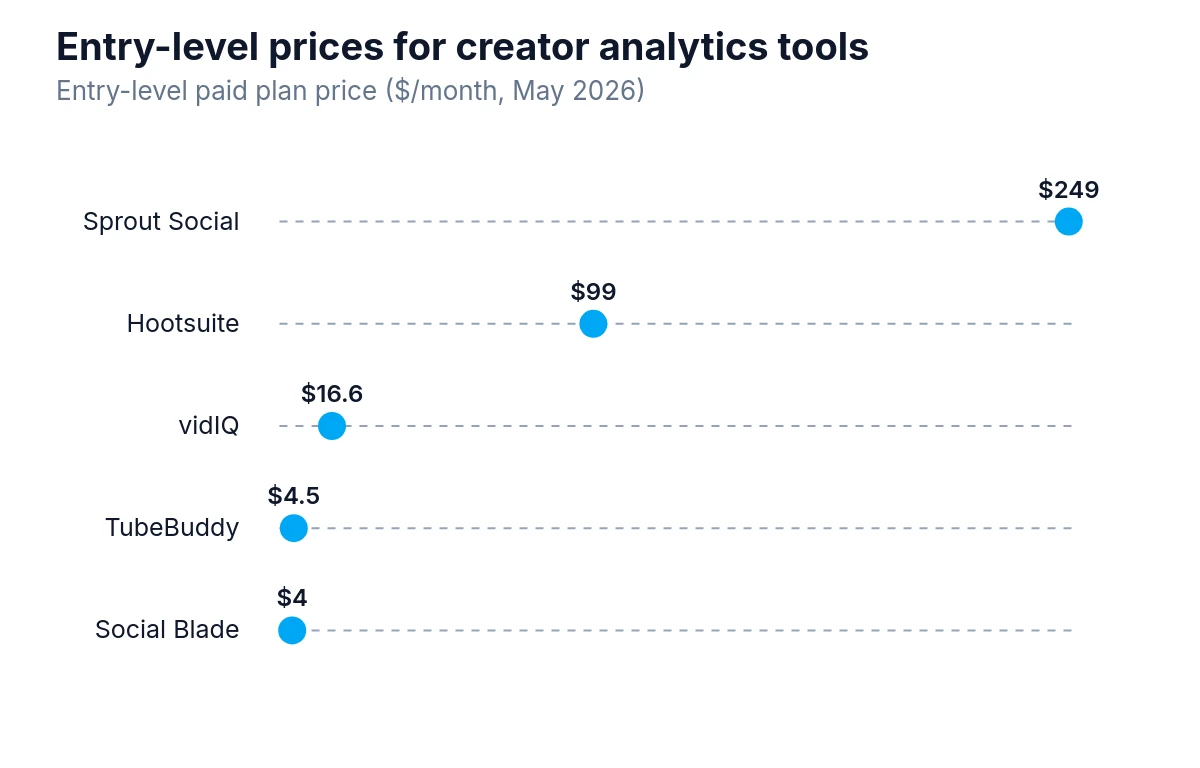
Entry-level plans for these creator analytics tools vary widely, from $3.99 per month for Social Blade up to $249 per month for Sprout Social.
YouTube Studio provides:
- Audience retention curves for every video, showing exactly where viewers stop watching
- Traffic source breakdowns (search, browse features, external, suggested video)
- Click-through rate on impressions, which tells you how well thumbnails and titles are performing
- Subscriber gain and loss per video
- Revenue data for monetized channels, broken down by video and traffic source
- Real-time data for the first 48 hours after publishing, with realtime performance comparison available across 60-minute and 48-hour windows
The retention curve alone is worth spending serious time with. YouTube's own guidance on retention graph diagnostics points to steep drops during slow intros, confusing explanations, or jump cuts as the places to look first, and suggests experimenting with pacing and storytelling rather than assuming a thumbnail problem. If viewers consistently leave at the 40% mark across multiple videos, that is a structural problem with how you are building content. No third-party tool gives you more granular retention data than YouTube Studio because that data comes directly from YouTube's systems.
Where YouTube Studio falls short is in competitive research, keyword discovery, and historical trend analysis across the broader platform. It shows you your channel in detail but tells you almost nothing about what is working for other channels in your space.
What Third-Party Tools Actually Add
Third-party analytics tools fill specific gaps. The most useful ones do at least one of these things well:
Competitive benchmarking. Seeing how your channel's growth rate, engagement, and view counts compare to similar channels. This is impossible inside YouTube Studio.
Keyword and search data. Understanding what people are searching for on YouTube, how competitive those searches are, and whether a topic has growing or declining interest. This is the core use case for tools like TubeBuddy and vidIQ.
Historical data and trend tracking. YouTube Studio shows a rolling window of data, but some creators need to analyze patterns over longer periods or track how a specific video performs over months.
Bulk analysis. Channels with large back catalogs sometimes need to audit hundreds of videos at once to find underperformers or spot patterns across a large dataset.
Audience overlap and discovery. Some tools show which other channels your audience watches, which helps with collaboration decisions and understanding your competitive position.
The mistake is paying for all of these capabilities when you only need one or two. Most creators do not need a tool that does everything.
The Major Tools and What They Are Actually Good At
TubeBuddy
TubeBuddy is a browser extension that layers directly on top of YouTube, which makes it feel less like a separate tool and more like an upgrade to the platform itself. Its strongest feature is keyword research: it shows search volume estimates, competition scores, and how well a given keyword matches your channel's existing authority.
The tag explorer and A/B thumbnail testing features are genuinely useful for channels that publish frequently and want to optimize systematically. The A/B test feature, available on paid tiers, lets you test two different thumbnails or titles against each other and see which drives better click-through rates.
TubeBuddy works best for channels that are actively trying to grow through search and want to make data-informed decisions about titles, tags, and thumbnails on every upload. It is less useful for channels that grow primarily through social sharing or community rather than YouTube search.
vidIQ
vidIQ covers similar ground to TubeBuddy but with a different interface philosophy. Where TubeBuddy integrates tightly into the YouTube interface, vidIQ has a more standalone dashboard feel alongside its browser extension.
Its daily ideas feature, which suggests video topics based on trending searches in your niche, is popular with creators who struggle with ideation. The competitor tracking feature lets you monitor specific channels and get notified when they publish, which is useful for staying aware of what is working in your space.
vidIQ also shows a "score" for each video that combines several optimization factors, which some creators find helpful as a quick checklist and others find reductive. If you like having a clear optimization target, vidIQ's scoring system gives you that. If you prefer to make judgment calls on each factor individually, it may feel like it oversimplifies.
Both TubeBuddy and vidIQ have free tiers that are worth trying before committing to a paid plan. The free versions are limited but give you a real sense of how each tool fits your workflow.
Social Blade
Social Blade is primarily a public tracking tool rather than a private analytics platform. It shows publicly available data about any YouTube channel: subscriber counts, estimated monthly views, and historical growth charts. The revenue estimates it shows are notoriously imprecise and should not be taken seriously.
Where Social Blade is genuinely useful is for quick competitive research. You can look up any channel and see its growth trajectory over time, which helps you understand whether a competitor is accelerating, plateauing, or declining. It is a free tool, and for that specific use case, it does the job.
Do not pay for Social Blade's premium tier unless you have a very specific need for bulk data exports. The free version covers most use cases.
Sprout Social and Hootsuite
These are social media management platforms that include YouTube analytics as part of a broader multi-platform dashboard. If you are managing YouTube alongside Instagram, TikTok, LinkedIn, and other channels, having everything in one place has real value.
For creators focused exclusively on YouTube, these tools are overkill. The YouTube-specific data they provide is less detailed than what you get from YouTube Studio, and the competitor-tracking pricing runs $200 or more per month, which is a significant recurring cost for features you may not need.
If you are a brand or agency managing multiple social channels and need consolidated reporting, Sprout Social or Hootsuite makes sense. If you are a YouTube-first creator, they do not.
Chartmetric and Similar Data Platforms
Chartmetric and similar platforms are built primarily for the music industry but have expanded to cover YouTube. They are most useful for musicians and record labels tracking how video content connects to streaming performance and audience growth across platforms.
For general YouTube creators, these tools are not the right fit. They solve a specific cross-platform problem for a specific type of content creator.
How to Match a Tool to Your Channel's Stage
The tool that makes sense for a channel with 500 subscribers is different from what makes sense at 100,000 subscribers. Here is a practical way to think about it by stage:
Early-Stage Channels (Under 10,000 Subscribers)
At this stage, the most valuable thing you can do is understand your own content deeply and find the topics that connect with your audience. YouTube Studio gives you everything you need for that. The retention curves, traffic sources, and click-through rate data are more actionable than any competitive research tool at this point.
If you want to add one tool, use the free tier of TubeBuddy or vidIQ for keyword research before you publish. Understanding whether a topic has search demand before you spend time making a video is genuinely useful. But do not pay for premium features yet. The return on that investment is low when your channel is still finding its footing.
Growing Channels (10,000 to 100,000 Subscribers)
This is where competitive research starts to matter. You have enough data to understand what your audience responds to, and now you want to understand how you compare to similar channels and where the growth opportunities are.
A paid tier of TubeBuddy or vidIQ makes more sense here, particularly if you publish frequently. The A/B testing features become more statistically meaningful with higher view counts, and the keyword research tools help you find adjacent topics that could bring in new viewers.
Spend time in YouTube Studio's audience tab at this stage. The "other channels your audience watches" data starts to become meaningful once you have a large enough audience, and it can point you toward collaboration opportunities and content gaps.
Established Channels (Over 100,000 Subscribers)
At this scale, you have enough data to do serious analysis. The questions shift from "how do I get more views" to "which content types are most efficient for my goals" and "how do I retain subscribers over time."
YouTube Studio's revenue analytics become more important for monetized channels. Understanding which videos drive the most revenue per view, which traffic sources convert to subscribers, and how your audience retention compares across content formats helps you allocate your production time more effectively.
Some creators at this stage invest in custom data solutions, pulling YouTube's API data into tools like Google Looker Studio (formerly Data Studio) to build dashboards tailored to their specific questions. This requires some technical comfort but gives you exactly the analysis you want rather than the analysis a tool vendor decided to build. Keep in mind that API data reproducibility concerns are real: data returned by APIs can differ substantially from what users see directly on the platform, so treat API-based outputs as directional rather than definitive.
The Metrics That Actually Matter
One of the most common analytics mistakes is tracking metrics that feel important but do not connect to channel growth. Subscriber count is the most obvious example. Subscribers matter, but a channel with 50,000 highly engaged subscribers who watch 70% of every video is in a much stronger position than one with 200,000 subscribers who average 20% retention.
The metrics worth paying close attention to:
- Average percentage viewed. This is the single most important quality signal for your content. YouTube's algorithm rewards videos that hold attention, and this number tells you directly how well you are doing that.
- Click-through rate on impressions. This measures thumbnail and title effectiveness. A low CTR means YouTube is showing your video to people and they are choosing not to watch it.
- Return viewers vs. new viewers. A healthy channel builds a core audience that comes back. If your return viewer percentage is very low, you are not converting casual viewers into subscribers.
- Watch time per subscriber. This is a rough measure of how engaged your subscriber base actually is.
- Revenue per mille (RPM) for monetized channels. RPM tells you how much you earn per thousand views. Understanding which content types drive higher RPM helps you make better decisions about what to prioritize.
No third-party tool gives you better data on most of these metrics than YouTube Studio. The external tools add context and competitive comparison, but the core metrics live in YouTube's own system.
A Practical Decision Framework
Before choosing any tool, answer these four questions:
- What specific question am I trying to answer that YouTube Studio cannot answer?
- How often will I actually use this tool, and does that justify the cost?
- Do I need this tool now, or would I benefit more from spending that time studying my existing data?
- If I am considering a paid tool, does it have a free trial or free tier I can test first?
If you cannot clearly answer question one, you do not need a third-party tool yet. The problem most creators have is not a lack of data. It is a lack of time spent understanding the data they already have.
Getting More From the Data You Already Have
The best analytics practice for most YouTube creators is not adding more tools. It is building a habit of reviewing the data you already have on a regular schedule.
A simple weekly review might look like this: check the last seven days of traffic sources to see where views are coming from, look at the retention curve for any video published in the past week, and note the click-through rate on recent uploads. A monthly review might compare your average view duration across content formats to see which types of videos hold attention best.
This kind of structured review, done consistently, generates more useful insights than any tool. The tool is just a way to surface data. The thinking still has to be yours.
Picking the Tool That Fits Your Actual Workflow
The best analytics tool for your channel is the one you will actually use consistently. A sophisticated platform that sits unused because the interface is confusing or the workflow does not fit how you work is worse than a simpler tool you check every week.
Start with YouTube Studio. Build the habit of reviewing your data regularly. Add a free tier of TubeBuddy or vidIQ if keyword research before publishing would help you. Upgrade to paid features when you can point to a specific capability that would change how you make decisions.
The goal is not to have the most data. It is to make better videos more consistently. Analytics tools are useful only when they help you do that.