YouTube Live Streaming Monetization in 2025: Every Revenue Stream Explained

You go live, viewers tune in, chat scrolls by, and somewhere in that digital exchange, money changes hands. But how much? And through which channels? If you stream on YouTube without understanding every monetization lever at your disposal, you are leaving revenue on the table.
This guide breaks down every way creators earn from YouTube live streams in 2025. From the pennies-per-view ad model to the recurring income of memberships, from Super Chats that light up your screen to sponsorship deals negotiated off-platform, we will cover the mechanics, the math, and the strategies that turn broadcasts into income.
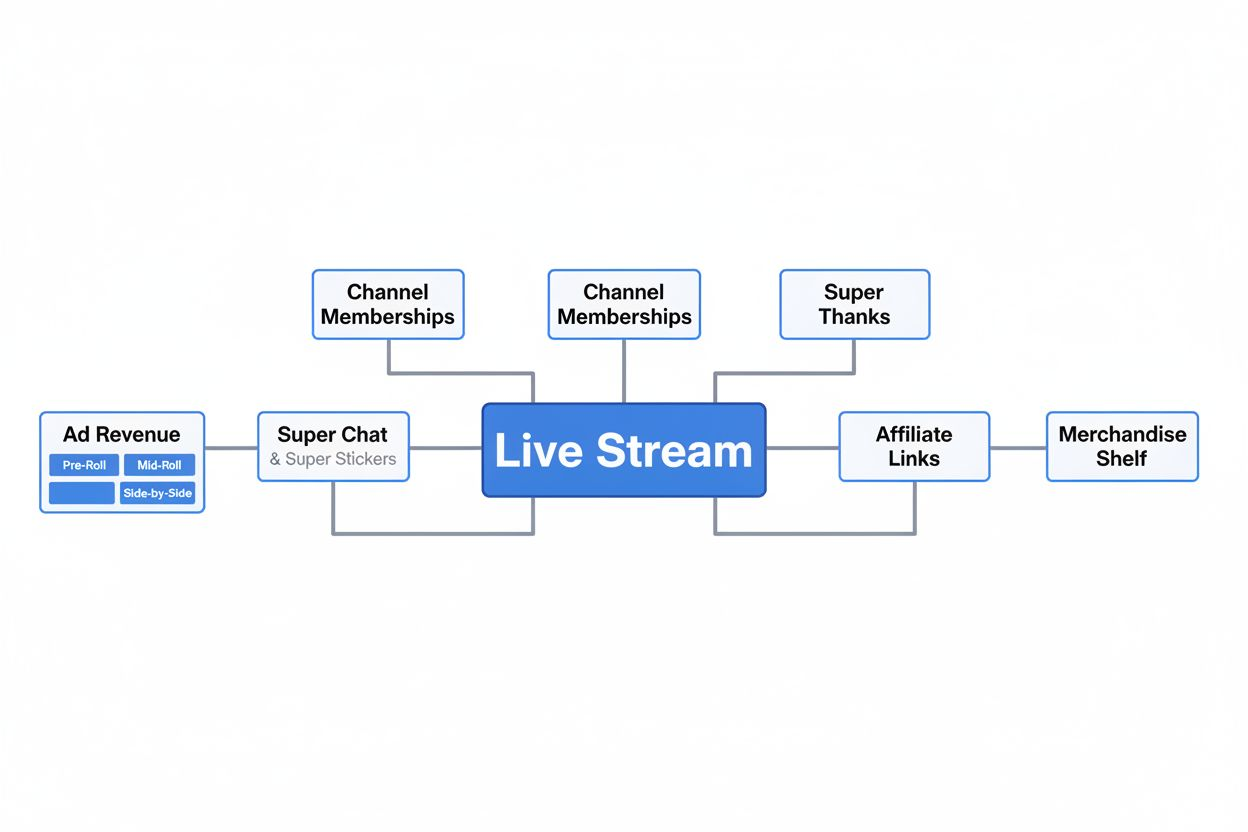
Ad Revenue: The Foundation Layer
Ads remain the baseline income for most live streamers. According to MilX, YouTube pays around $0.01 to $0.03 per view on live streams. That range depends on your niche, audience geography, and advertiser demand during your broadcast window.
When you enable monetization on a live stream, YouTube automatically turns on pre-roll ads. Viewers see a commercial before your stream starts. You earn a split of that ad revenue.
Mid-roll ads are where the real uplift happens. YouTube introduced live automated mid-rolls, and creators who adopted them saw on average over 20% uplift in instream ad revenue per hour. You control the frequency: Low, Medium, or High. You set intervals at 6, 12, 18, 24, or 30 minutes.
The trade-off is viewer experience. Interrupt too often and chat engagement drops. Wait too long and you miss revenue opportunities. Most creators land on 12 to 18-minute intervals for streams longer than an hour.
YouTube's 2025 updates brought side-by-side ads. According to Influencer Marketing Hub, these new ads run alongside content rather than interrupting the stream. Your broadcast continues in a smaller frame while the ad plays next to it. Early tests show viewers tolerate these better than full interruptions, which may mean higher retention and more total ad impressions per stream.
Calculating Your Ad Income
A live stream with 5,000 views at $0.02 per view generates $100 in ad revenue. If you stream twice a week, that is $800 per month from ads alone. Scale to 20,000 views per stream and you are looking at $3,200 monthly.
Geography matters. Viewers in the United States, Canada, and Western Europe generate higher CPMs (cost per thousand impressions) than viewers in other regions. A gaming channel with 80% U.S. traffic will earn more per view than a channel with global distribution.
Niche matters too. Finance and business content commands premium ad rates. Gaming and entertainment sit in the middle. Some categories, like news commentary on sensitive topics, may face limited ad inventory due to advertiser brand safety concerns.
Super Chat and Super Stickers: Real-Time Tipping
Super Chats let viewers pay to pin their messages in your live chat. Prices range from $1 to $500. The message stays pinned for a duration based on the amount: a $1 Super Chat might stay visible for two minutes, while a $100 Super Chat can dominate the top of your chat for hours.
Super Stickers work the same way but use animated images instead of text. Viewers buy them to stand out visually in the chat feed.
You keep 70% of Super Chat and Super Sticker revenue. YouTube takes 30%. If a viewer sends a $50 Super Chat, you receive $35. There is no minimum payout threshold specific to Super Chats; they contribute to your overall YouTube earnings, which pay out once you hit $100.
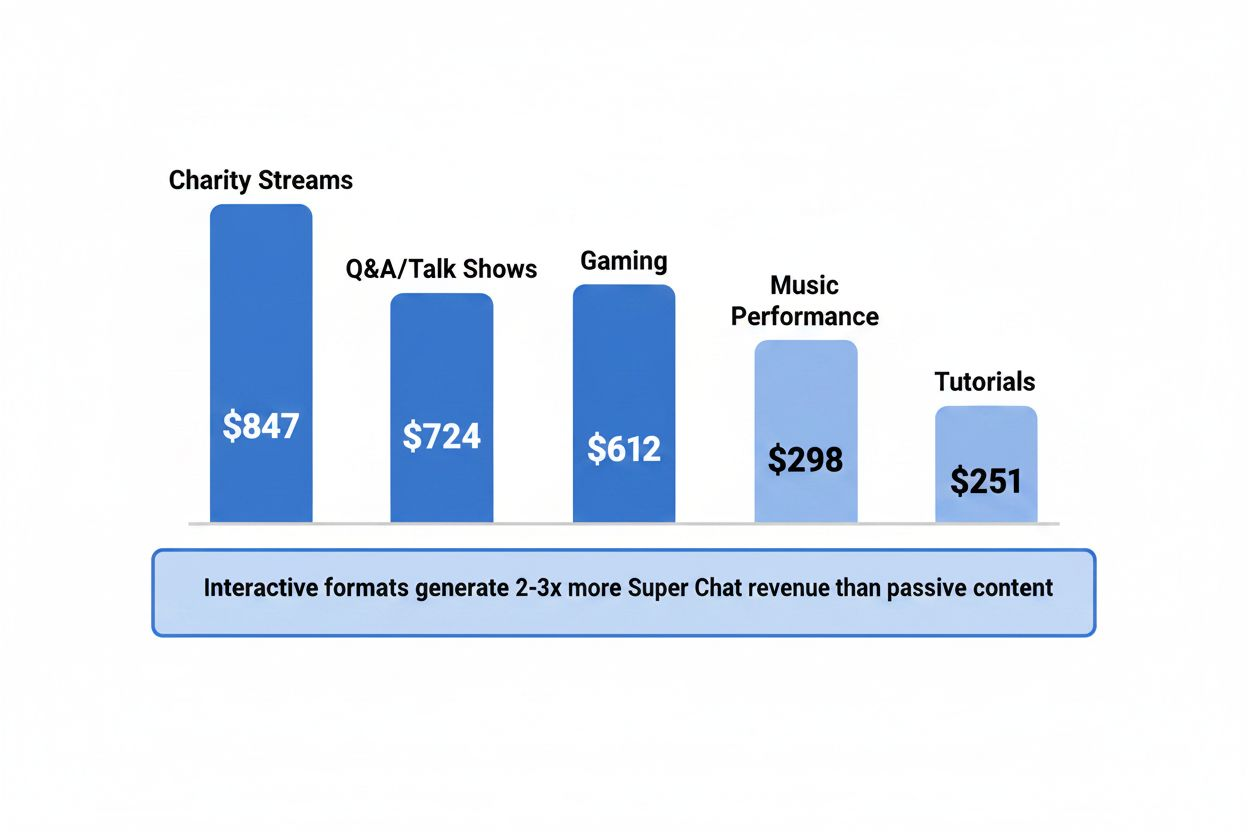
Super Chats thrive in interactive streams. Q&A sessions, live tutorials, gaming streams with active chat participation, and charity fundraisers all generate strong Super Chat activity. Viewers pay for attention and recognition. If you ignore Super Chats or fail to acknowledge donors, the revenue stream dries up.
Some creators structure entire streams around Super Chat interaction. They set thresholds: "Send a $10 Super Chat to choose the next song" or "Top Super Chat of the night picks tomorrow's topic." This gamification drives higher spending per viewer.
Channel Memberships: Recurring Revenue
Channel memberships turn one-time viewers into monthly subscribers. Viewers pay $4.99, $9.99, or $24.99 per month (you set the tiers) for perks like custom badges, emojis, members-only posts, and exclusive live streams.
According to MilX, creators keep 70% of channel membership revenue. Even 100 members at $4.99 brings in approximately $350 per month after YouTube's cut. Scale to 500 members and you are earning $1,750 monthly before you go live.
Memberships require 30,000 subscribers to unlock (or 1,000 for gaming channels). Once eligible, the key is offering perks that feel exclusive without creating too much extra work.
Successful membership perks include:
- Members-only live streams once or twice a month
- Early access to regular streams (members join 10 minutes before the public)
- Custom emojis and badges that show status in chat
- Behind-the-scenes content or bloopers posted to the Community tab
- Shoutouts during streams
- Members-only Discord server access
The best perks scale without eating all your time. A members-only stream once a month is manageable. Promising to personally reply to every member's comment is not.
Retention matters more than sign-ups. A channel with 200 members who stay for six months earns more than a channel that signs up 500 members who cancel after one month. Deliver consistent value. Remind members of their perks. Acknowledge them in chat.
Super Thanks: Post-Stream Monetization
Super Thanks lets viewers tip on VODs (video on demand). After your live stream ends and the replay is available, viewers can send one-time payments from $2 to $50. You keep 70%.
Super Thanks works well for evergreen content. A tutorial stream that continues to get views for months can generate Super Thanks long after you went live. Viewers who find value in the replay and want to support you have an easy option.
The feature is less prominent than Super Chat, so revenue tends to be lower. But it requires zero extra effort. Enable it and let it run passively on all your content.
Sponsorships and Brand Deals
Sponsorships are negotiated directly with brands, outside YouTube's revenue share. A company pays you a flat fee or commission to mention their product, demonstrate their service, or integrate their brand into your stream.
Rates vary wildly based on your audience size, niche, and engagement. A creator with 50,000 subscribers and high engagement might charge $500 to $2,000 per sponsored stream. A creator with 500,000 subscribers in a premium niche like finance or tech could command $5,000 to $20,000.
Sponsorships work best when the product aligns with your content. A gaming channel promoting a gaming chair or energy drink feels natural. The same channel promoting tax software feels forced.
Disclose sponsorships clearly. YouTube requires it, and your audience expects transparency. Use the built-in paid promotion disclosure feature and mention the sponsorship verbally during the stream.
Some creators use platforms like Grapevine, AspireIQ, or FameBit to connect with brands. Others build relationships directly by reaching out to companies whose products they already use.

Affiliate Marketing During Streams
Affiliate links let you earn commissions when viewers buy products you recommend. You share a trackable link in your stream description or pin it in chat. When someone clicks through and makes a purchase, you earn a percentage.
Amazon Associates is the most common program. You earn 1% to 10% depending on the product category. Tech and gaming accessories earn around 3% to 4%. Luxury beauty products can earn up to 10%.
Other affiliate programs include:
- Affiliate networks like ShareASale, CJ Affiliate, and Rakuten
- Direct brand affiliate programs (many software companies offer 20% to 30% commissions)
- Gaming platforms like Humble Bundle or Green Man Gaming
The key is relevance. If you stream art tutorials, link to the brushes, tablets, and software you use. If you stream cooking, link to kitchen tools and ingredients. If you review tech, link to the products you are discussing.
Call out the links during your stream. "I am using the Logitech C920 webcam, link is in the description if you want to check it out." Passive links in the description earn less than active mentions during the broadcast.
Track your performance. Most affiliate programs provide dashboards showing clicks, conversions, and earnings. Double down on products that convert well. Drop links that generate clicks but no sales.
Merchandise Shelf
YouTube lets eligible creators display up to 12 merchandise items below their live streams. Viewers can browse and buy without leaving the platform.
You need 10,000 subscribers to unlock the merchandise shelf. You connect a merchandise partner like Teespring, Spreadshop, or Fourthwall. They handle production, shipping, and customer service. You design the products and set the markup.
Typical margins are $5 to $15 per item. A t-shirt might cost $10 to produce and ship, and you sell it for $25, netting $15. Hoodies, hats, mugs, and stickers are popular options.
Merchandise works best when it is tied to your brand or inside jokes from your community. Generic designs rarely sell. A catchphrase your chat repeats constantly, printed on a t-shirt, will move units. A logo no one recognizes will not.
Promote your merchandise during streams. Wear your own merch on camera. Show new designs. Offer limited-time discounts to create urgency.
Combining Revenue Streams for Maximum Income
The creators earning the most from live streams stack multiple revenue sources. They do not rely on ads alone or memberships alone. They layer everything.
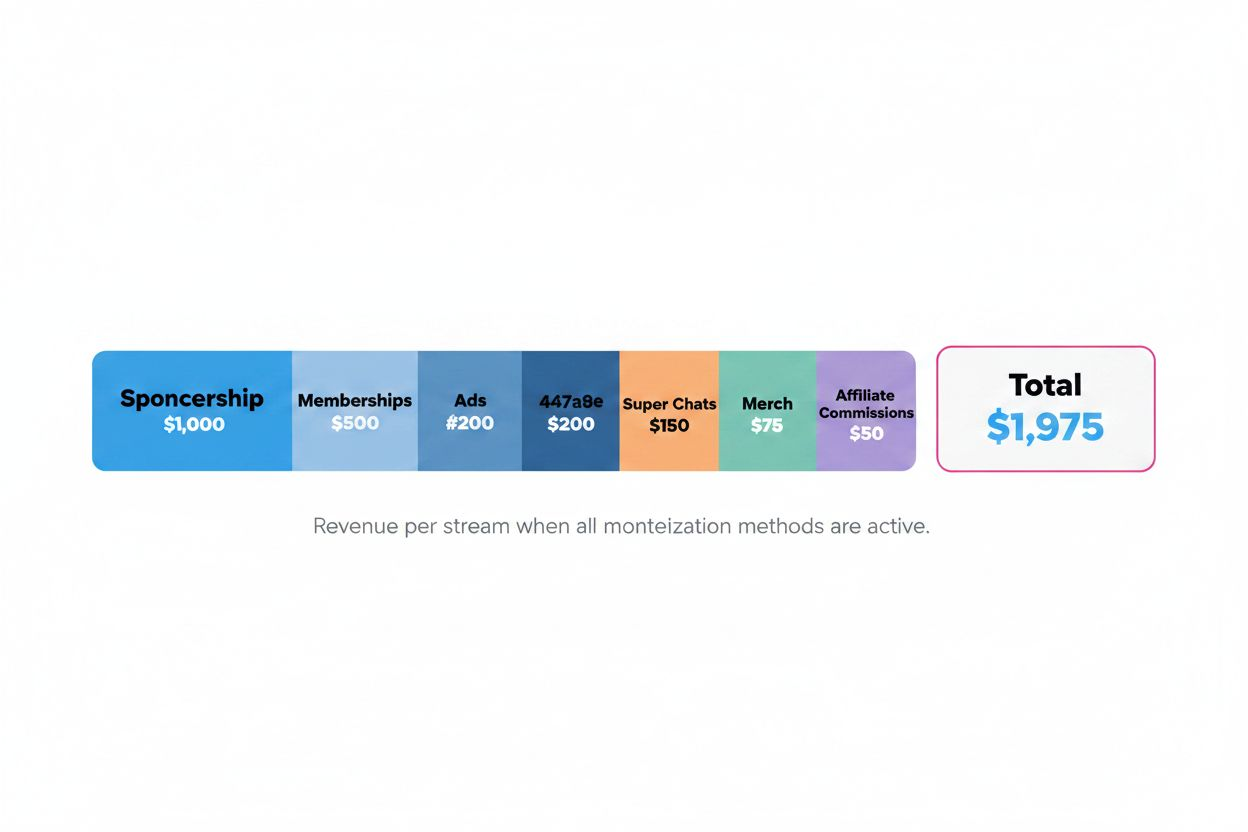
A typical high-earning stream might generate:
- $200 from ads (10,000 views at $0.02 per view)
- $150 from Super Chats (10 viewers sending an average of $15 each)
- $500 from memberships (100 members at $4.99, 70% cut)
- $1,000 from a sponsorship (negotiated flat fee)
- $50 from affiliate commissions (5 sales at $10 commission each)
- $75 from merchandise (5 shirts sold at $15 profit each)
Total: $1,975 for a single two-hour stream.
Stream twice a week and you are looking at nearly $16,000 per month. Not every stream will hit those numbers, but the math shows what is possible when you activate every lever.
Automated Streams and Passive Income
YouTube allows 24/7 automated streams using pre-recorded content looped continuously. According to MilX, a small music channel with 8,000 subscribers doubled recommended traffic from 22% to 41.8% in 90 days using 24/7 automated streams.
Automated streams generate ad revenue around the clock. You upload a video file, set it to loop, and let it run. Viewers tune in at any time. YouTube serves ads. You earn money while you sleep.
This works well for:
- Music channels (lofi beats, study music, ambient soundscapes)
- Nature content (aquarium streams, fireplace videos, rain sounds)
- Meditation and relaxation content
- Evergreen educational content that viewers can drop into anytime
The downside is no live interaction. You cannot respond to chat, acknowledge Super Chats, or build real-time community. But for passive income, automated streams are effective.
Some creators run automated streams during off-hours and go live manually during peak times. This maximizes both passive ad revenue and active engagement revenue.
New Features in 2025: AI Highlights and Rehearsal Mode
YouTube's 2025 "Made on YouTube" update introduced features that extend the value of each live stream. According to Influencer Marketing Hub, AI highlight clips automatically slice streams into Shorts. These Shorts appear on your channel and in the Shorts feed, driving additional views and ad revenue from a single broadcast.
You do not need to manually edit clips. YouTube's AI identifies high-engagement moments (based on chat activity, viewer retention spikes, and audio cues) and generates vertical video clips. You review and publish them with one click.
This turns every live stream into multiple monetizable assets. A two-hour stream might generate five Shorts, each earning ad revenue independently. Shorts also drive new subscribers back to your main channel, increasing your audience for future streams.
Rehearsal mode, also introduced in 2025, lets creators stage a broadcast privately before going public. You can test your setup, run through your script, check audio and video quality, and make sure everything works without viewers watching. Once you are ready, you flip the stream to public.
This reduces technical errors during live broadcasts, which improves viewer retention and ad revenue. Fewer viewers leave due to audio issues or awkward pauses while you troubleshoot.
Eligibility Requirements for Monetization
Not every channel can monetize live streams immediately. YouTube requires:
- 1,000 subscribers
- 4,000 watch hours in the past 12 months (or 10 million Shorts views in the past 90 days)
- Adherence to YouTube's monetization policies
- An active AdSense account
Once you meet these thresholds, you apply for the YouTube Partner Program (YPP). Approval typically takes a few weeks. After approval, you can enable ads, Super Chat, Super Thanks, and memberships (memberships require 30,000 subscribers or 1,000 for gaming channels).
Some features have additional requirements:
- Merchandise shelf: 10,000 subscribers
- Channel memberships: 30,000 subscribers (1,000 for gaming)
- Custom thumbnails for live streams: No specific requirement, but account must be verified
If your channel is not yet eligible, focus on growing your audience. Consistent streaming schedules, engaging content, and cross-promotion on other platforms (Instagram, TikTok, Twitter) all help you reach the thresholds faster.
Optimizing for Higher Revenue Per Stream
Revenue per stream depends on more than just turning on monetization. You need to optimize for higher CPMs, more Super Chats, and better conversion on memberships and affiliate links.
Stream during high-CPM hours. Ad rates fluctuate throughout the day. In the U.S., evenings (7 PM to 10 PM local time) and weekends tend to have higher advertiser demand, which means higher CPMs. Test different time slots and track your revenue per stream.
Engage with Super Chats immediately. When someone sends a Super Chat, read it out loud and respond. This encourages others to send their own. If you ignore Super Chats, viewers stop sending them.
Promote memberships at the start and end of each stream. Mention the perks. Show the custom emojis. Remind viewers that members get early access or exclusive content. Do not be pushy, but do not assume viewers know about memberships either.
Use clear calls to action for affiliate links. "I am using this microphone, link is in the description" is weak. "If you want the same mic I am using, it is the Audio-Technica AT2020, link is pinned in the description and in the first comment" is stronger.
Test mid-roll ad frequency. Start with 18-minute intervals. Track your revenue and viewer retention. If retention stays strong, try 12-minute intervals. If viewers drop off, extend to 24 minutes.
Create urgency for merchandise. Limited-time designs or discounts drive more sales than permanent storefronts. "This design is only available for the next 48 hours" converts better than "Check out my merch."
Tax and Payment Considerations
YouTube pays earnings monthly once you hit $100. Payments go through AdSense. You receive a single payment that combines ad revenue, Super Chat, Super Thanks, and memberships.
Sponsorships and affiliate commissions are paid separately by the brands or affiliate networks. Track these payments independently for tax purposes.
In the U.S., YouTube reports your earnings to the IRS if you earn more than $600 in a year. You receive a 1099 form. You are responsible for paying income tax and self-employment tax on your earnings.
Set aside 25% to 30% of your YouTube income for taxes. This is a rough guideline; your actual tax rate depends on your total income and deductions. Consult a tax professional if you are earning significant income from streaming.
If you are outside the U.S., YouTube withholds taxes based on your country's tax treaty with the United States. Some creators lose 30% of their U.S. ad revenue to withholding taxes. Others, in countries with favorable treaties, lose nothing. Check YouTube's tax information page for your country.
What Happens Next
YouTube continues to roll out new monetization features. The platform is testing tipping options beyond Super Chat, exploring NFT integrations for digital collectibles, and expanding shopping features that let creators sell products directly during streams.
The shift toward AI-generated highlights and automated content repurposing means each live stream will generate more long-term value. A single broadcast will feed Shorts, clips, and VOD views for weeks or months.
Creators who understand and activate every revenue stream will outpace those who rely on ads alone. The difference between earning $200 per stream and $2,000 per stream is not luck. It is strategy, optimization, and stacking income sources.
If you are streaming on YouTube, you have access to more monetization tools than any other platform. Use them.