Best Tools for Measuring YouTube Sponsorship Impact

YouTube sponsorships move serious money. Per-post influencer rates can range from around $100 to five-plus figures depending on platform, niche, and content type. Yet a surprising number of marketing teams still evaluate those deals by gut feel, a rough view count, and whether the creator seemed enthusiastic in the brief.
That approach burns budget. A channel with two million subscribers might deliver a fraction of the conversions that a tightly focused creator with 80,000 subscribers can produce, simply because the audience composition is different. Research confirms that micro-influencer engagement runs higher than engagement at larger tiers, which helps explain why audience size alone is a poor predictor of campaign results. Measuring sponsorship impact properly is what separates brands that scale creator partnerships from those that try it once, see murky results, and walk away.
This article covers the tools and methods that actually work, why some popular metrics mislead you, and how to build a measurement system that gives you reliable data across multiple campaigns.
Why Standard YouTube Metrics Are Not Enough
Views and likes tell you something, but not what brands actually need to know. A video with 500,000 views and a 12% like ratio might have generated zero purchases. Another with 80,000 views might have driven hundreds of sign-ups. The difference usually comes down to audience trust, placement timing within the video, and whether the product actually fits the creator's content.
The metrics that matter for sponsorship measurement fall into two categories: engagement signals that predict intent, and conversion signals that confirm action. Most brands track the first category well and the second category poorly.
Engagement Signals Worth Tracking
Average view duration is more useful than raw view count. If a video is 15 minutes long and the average viewer watches 11 minutes, the sponsorship segment (typically placed at the 2-minute or 8-minute mark) likely received strong exposure. If average duration is 3 minutes on a 15-minute video, most viewers never reached the mid-roll placement.
Comment sentiment gives you qualitative data that numbers cannot. Viewers who say "I already use this product" or "just ordered because of this video" are telling you something the analytics dashboard will not.
Click-through rate on any cards or end screens linked to the sponsorship destination is a direct engagement signal, though it is often overlooked because it requires the creator to actually set up those links.
Conversion Signals Worth Tracking
These require setup on your end before the campaign launches. Without custom tracking infrastructure, you are essentially flying blind after the viewer leaves YouTube.
The Core Tracking Infrastructure Every Campaign Needs
Before any tool can give you useful data, you need to build the attribution layer. This is not complicated, but it requires doing it before the video goes live, not after.
Custom URLs and UTM parameters. Every sponsorship should drive traffic to a URL that is unique to that creator and that campaign. A UTM-tagged link lets Google Analytics (or any web analytics platform) tell you exactly how many sessions, sign-ups, or purchases came from a specific video. Without this, YouTube traffic from sponsorships gets lumped into "direct" or "referral" traffic and becomes invisible.
Unique promo codes. These serve two purposes. They give viewers a discount or incentive, which increases conversion rate. And promo-code attribution maps directly to purchases, giving you a clean, unambiguous signal that works even when someone watches the video, closes their browser, and comes back three days later to make a purchase. Promo code redemptions are the most reliable conversion signal available for YouTube sponsorships.
Dedicated landing pages. For higher-value campaigns, sending traffic to a page built specifically for that creator's audience lets you A/B test messaging, track scroll depth, and measure time-on-page in ways that a generic product page cannot.
Google Analytics and GA4
Google Analytics remains the most widely used tool for tracking what happens after someone clicks a sponsorship link. GA4, the current version, offers some specific advantages for YouTube sponsorship tracking.
The traffic acquisition report in GA4 lets you filter sessions by UTM source and medium, so you can isolate exactly how many people arrived from a specific creator's link. From there, you can follow that cohort through your conversion funnel: how many added to cart, how many completed checkout, what the average order value was.
GA4 also handles cross-device attribution better than its predecessor. A viewer might watch on their TV, then purchase on their phone. The GA4 identity resolution fallback combines userId and device ID within the same reports, which matters for YouTube where a large share of viewing happens on connected TVs.
The limitation of GA4 is that it only shows you what happens on your own site. It cannot tell you about video performance, audience demographics, or how the sponsorship segment performed within the video itself. For that, you need creator-side data.
YouTube Studio and Creator-Provided Analytics
YouTube Studio is the analytics platform creators use, and it contains data that brands rarely see unless they ask for it. When negotiating a sponsorship, it is worth requesting a post-campaign screenshot or export of specific metrics from the creator's Studio dashboard.
The most useful data points to request:
- Traffic source breakdown for the sponsored video (what percentage came from YouTube search, suggested videos, external links, etc.)
- Audience retention graph, specifically the curve around the sponsorship segment
- Viewer demographics for that specific video (age, gender, geography)
- Impressions and click-through rate on any cards linking to your product
Creators are generally willing to share this data after the campaign, especially if you frame it as helping you understand how to make future collaborations work better. Some will share it proactively.
The retention graph is particularly valuable. A sharp drop at the moment the sponsorship segment begins tells you something important about how the integration was received. A flat or gradual decline suggests viewers stayed engaged through the read.
Third-Party Creator Analytics Platforms
Several platforms exist specifically to help brands research creators and track campaign performance. They pull data from YouTube's public API and, in some cases, from creator-authorized data sharing.
Social Blade
Social Blade is primarily a research tool rather than a campaign measurement tool. It tracks subscriber growth, estimated view counts, and historical channel performance. It is useful for vetting creators before a deal: a channel that has grown steadily over two years is a different risk profile than one that spiked suddenly, since indicators of purchased followers include sudden, massive subscriber jumps without corresponding viral content, while authentic audience growth tends to be slow and steady.
Social Blade does not give you campaign-level conversion data, but it helps you make better decisions about who to work with in the first place.
Tubular Labs and Similar Enterprise Platforms
Tubular Labs, Conviva, and similar enterprise-grade platforms offer deeper cross-platform analytics, audience overlap analysis, and benchmarking against industry averages. These tools are built for agencies and larger brands running multiple creator campaigns simultaneously.
They can surface the kind of audience behavior data that changes how you think about creator selection: Tubular's Consumer Insights found, for instance, that home-automation viewers' shopping propensity for cleaning supplies runs 36x higher than the average social viewer, the sort of cross-category signal that helps you evaluate whether a proposed sponsorship rate is reasonable before you sign anything.
The tradeoff is cost. These platforms are subscription-based and priced for teams with meaningful creator budgets. For a brand running one or two sponsorships a year, the investment may not make sense.
Grin, Aspire, and Creator Management Platforms
Platforms like Grin, Aspire (formerly AspireIQ), and Creator.co are built to manage the full sponsorship workflow: discovery, outreach, contracting, content approval, and performance tracking. They pull in post-campaign metrics and can track promo code redemptions and affiliate link clicks directly within the platform.
For brands managing more than a handful of creator relationships, these platforms save significant time and create a centralized record of what each campaign delivered. The performance dashboards let you compare campaigns side by side, which is how you start to build reliable benchmarks over time.
Affiliate Link Tracking
Affiliate links are a natural fit for YouTube sponsorships and solve one of the core attribution problems: the delayed conversion. A viewer might watch a video on Tuesday and buy on Friday. A UTM link will often lose that attribution if the viewer's session expires. An affiliate link, tracked through a platform like Impact, ShareASale, or PartnerStack, can maintain attribution for a configurable window (30 days, 60 days, or longer).
Affiliate tracking also creates a natural incentive alignment. If you pay creators a base fee plus a commission on conversions, they have a reason to optimize the integration, not just deliver it. Creators who are confident in their audience's purchasing behavior often prefer this structure because it lets them earn more than a flat rate would allow.
The limitation is that affiliate links are less clean for awareness-focused campaigns where the goal is not immediate conversion. And some creators resist affiliate-only deals because they bear the risk if the product does not convert well, regardless of how many people they sent to the page.
Measuring Brand Lift, Not Just Conversions
Not every sponsorship goal is a direct sale. Brand awareness campaigns, product launches, and category entry campaigns are trying to shift perception or build recognition, and those outcomes do not show up cleanly in conversion data.
For these campaigns, brand lift measurement is the right approach. Google's Brand Lift tool (available through YouTube Ads, not organic sponsorships directly) runs surveys to measure changes in awareness, recall, and purchase intent among people who saw a piece of content versus those who did not. While this tool is built for paid YouTube advertising, the methodology can be adapted for organic sponsorships.
Some brands run their own pre- and post-campaign surveys using tools like Pollfish or SurveyMonkey Audience, targeting the creator's audience geography and demographic profile. The survey asks about brand awareness and purchase consideration before the video goes live, then again four to six weeks after. The delta is your brand lift estimate.
This is not a precise measurement, but it gives you directional data that pure conversion tracking cannot provide.
How to Calculate Whether a Sponsorship Was Worth It
The math is straightforward once you have the data. The challenge is collecting the data consistently.
Start with total cost: the creator fee, any product sent, agency fees if applicable, and the cost of producing any custom assets the creator used.
Then calculate total attributed revenue: promo code redemptions multiplied by average order value, plus UTM-attributed conversions multiplied by average order value. If you have a subscription product, factor in the expected lifetime value of new customers, not just first-purchase revenue.
Divide attributed revenue by total cost. If the result is above 1, the campaign returned more than it cost. Most brands target a specific return on ad spend threshold (often 2x to 4x for direct response campaigns) and evaluate creators against that benchmark over multiple campaigns.
For awareness campaigns where direct revenue attribution is not the goal, the calculation shifts to cost per thousand views (CPM) compared to other channels. If a sponsorship delivers views at a CPM that is competitive with your paid social or display advertising, and those views come with stronger audience trust and longer format engagement, the sponsorship is likely delivering value even without a clean conversion signal.
Common Measurement Mistakes That Distort Your Results
Evaluating campaigns too quickly. YouTube videos have long tails. A video published today might get half its total views over the next six to eighteen months as it surfaces in search and suggested feeds. Measuring a campaign at the 30-day mark and calling it underperforming may mean you are missing the majority of its eventual impact.
Ignoring the halo effect. When a creator mentions your brand, some viewers will search for you directly rather than click the link. That traffic shows up as organic search or direct in your analytics, not as a YouTube referral. If you see a spike in branded search volume or direct traffic in the weeks after a sponsorship goes live, that is part of the campaign's impact.
Comparing unlike campaigns. A sponsorship on a gaming channel and a sponsorship on a personal finance channel are not directly comparable even if they cost the same and reach similar view counts. Build benchmarks within categories, not across them.
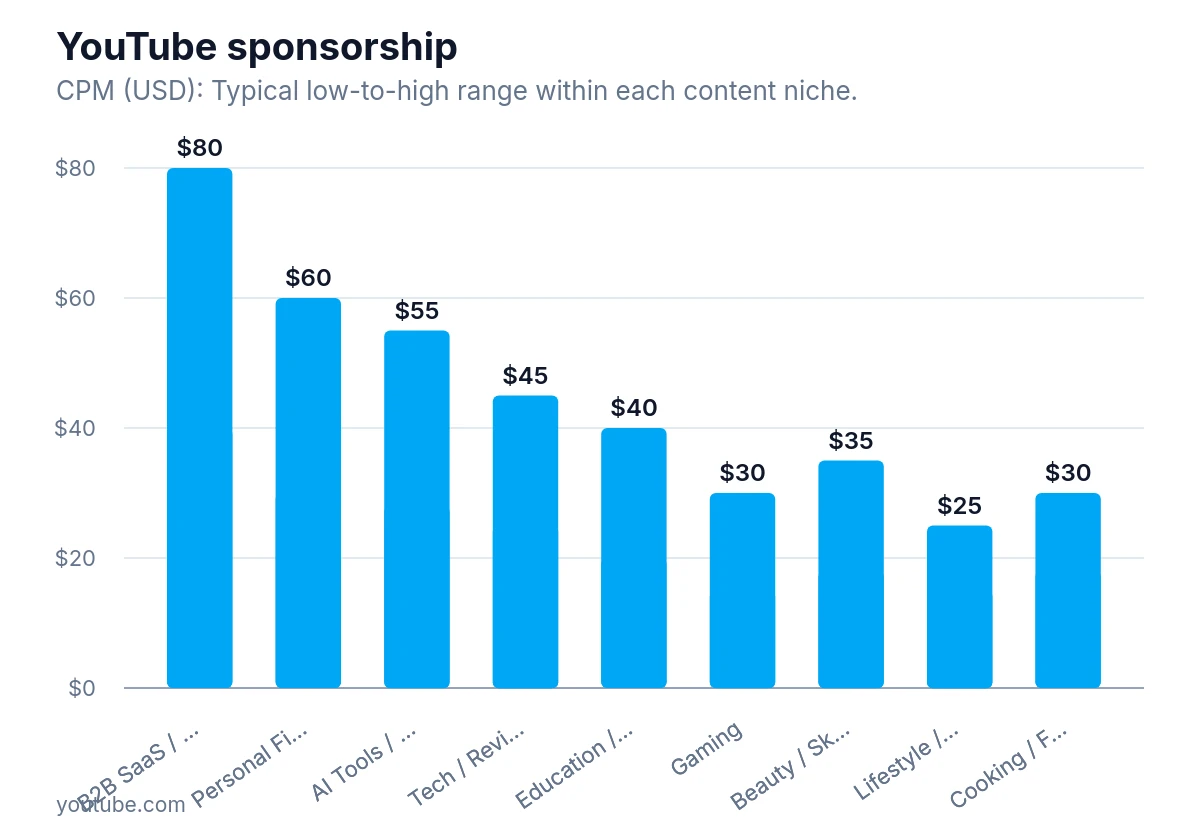
YouTube sponsorship CPMs vary by niche, running roughly from $15 up to $80, so compare rates within similar content categories rather than across different kinds of channels.
Relying on a single campaign to judge a creator. One video is a sample size of one. A creator whose first campaign with you underperforms might be a strong long-term partner once they understand your product better and their audience has seen it more than once. Brands that build ongoing relationships with creators consistently report better results than those running one-off deals.
Not requesting post-campaign data from the creator. This is the most common missed opportunity. Most creators will share YouTube Studio data if asked. Many brands never ask.
Building a Measurement System That Compounds
The real value of measuring YouTube sponsorships carefully is not the insight from any single campaign. It is the database you build over time. After ten campaigns, you know what CPM range to expect in your category, what conversion rate is realistic for your product, which creator audience profiles convert best, and what video formats (dedicated vs. integrated mention vs. pre-roll) perform differently for your goals.
That knowledge base is a competitive advantage. Brands that have been measuring carefully for two or three years can evaluate new creator proposals in minutes because they have real benchmarks to compare against. They can also have more productive conversations with creators about what makes integrations work, because they have data to show what has and has not worked in the past.
Start with the basics: UTM parameters, promo codes, and a simple spreadsheet tracking cost and attributed conversions. Add creator-provided analytics data for each campaign. As volume grows, consider a creator management platform to centralize the data. The tools matter less than the discipline of collecting consistent data across every campaign.
YouTube sponsorships are one of the few marketing channels where audience trust is genuinely built into the format. Measuring their impact properly is how you figure out which creators have built the kind of trust that translates into action for your specific product.