Optimizing Video Descriptions for Better YouTube Monetization
The Box Most Creators Leave Empty
Most YouTube creators treat the description box like a formality. They paste in a few links, maybe a sentence or two about the video, and move on. That habit is quietly costing them money.
The description field is one of the most direct levers you have for improving how YouTube's algorithm understands your content, how viewers discover your videos through search, and how effectively you convert viewers into subscribers, customers, or affiliate revenue. Ignore it, and you are leaving all three of those benefits on the table.
This article breaks down exactly how to write descriptions that do real work: for search visibility, for monetization, and for building the kind of audience that actually generates income.
Why Descriptions Matter More Than Most Creators Think
YouTube is a search engine. The second largest in the world, in fact. When someone types a query into the search bar, YouTube's system has to decide which videos are most relevant. It cannot watch your video. It reads your text.
Your title gets the most weight, but the description is where you have room to give the algorithm real context. YouTube video descriptions allow a maximum of 5,000 characters on every single upload. Most creators use a fraction of it.
Beyond search, descriptions affect two other things that directly touch monetization:
- Click-through behavior from suggested and browse features
- Viewer actions like clicking affiliate links, visiting channel memberships, or joining email lists
YouTube's ad revenue depends on watch time and impressions, but your total monetization depends on everything that happens around the video too. Descriptions are where a lot of that "around the video" action happens.
The Structure That Actually Works
A well-optimized description has a clear structure. It is not a wall of text, and it is not three sentences. Think of it in three zones.
Zone 1: The First 150 Characters
This is the only part of your description that appears in search results without the viewer clicking "Show more." It is your preview text. Treat it like a second title.
The first 150 characters should:
- Summarize what the video covers in plain language
- Include your primary keyword naturally
- Give a reason to click or keep watching
Do not start with your channel name, a generic greeting, or a link. Those waste the most valuable real estate in the field. Start with the actual content.
A creator making a video about budgeting for freelancers might open with: "Freelance budgeting is harder than it looks when your income changes every month. Here's the system I use to stay profitable year-round."
That sentence tells the viewer what the video is about, signals relevance to the algorithm, and creates a reason to watch.
Zone 2: The Full Description Body
After the preview text, you have room to expand. This section should run at least 150 to 300 words for most videos. Longer videos on complex topics can justify more.
Use this space to:
- Describe what the video covers in more detail, using natural language that includes related terms and phrases your audience would search for
- Mention any tools, products, or resources discussed in the video (this also supports your affiliate links)
- Add timestamps if the video is longer than 8 to 10 minutes
- Include a brief call to action for subscribing or joining your community
The goal is not to stuff keywords. It is to write a genuinely useful summary that happens to use the language your audience uses. If you are teaching someone how to edit videos on a budget, a description that mentions "free editing software," "color grading for beginners," and "export settings for YouTube" is not keyword stuffing. It is accurate.
Zone 3: The Links and Boilerplate Section
The bottom of your description is where links live. This section can be templated and reused across videos with minor adjustments.
A typical structure looks like this:
- Affiliate links for products mentioned in the video
- Links to related videos or playlists
- Channel membership or Patreon link
- Social media handles
- Email list or newsletter signup
- Legal disclosures (affiliate disclaimer, sponsorship disclosure if applicable)
Keep this section organized. Group related links together. Label each link clearly so viewers know where they are going. "My favorite camera (affiliate link)" is more trustworthy than a bare URL.
Keywords: How to Find and Use Them Without Sounding Robotic
Keyword research for descriptions does not require expensive tools, though tools help. The basics are free.
Start by typing your video topic into YouTube's search bar and watching what autocomplete suggests. Those suggestions are real queries people are typing. Write them down. A few of them belong in your description.
Also look at the "Searches related to" section at the bottom of Google results for your topic. YouTube and Google share significant search behavior data, so Google's related searches often reflect what YouTube users want too.
Once you have a list of 8 to 12 relevant phrases, work them into your description naturally. The test is simple: read it out loud. If a phrase sounds awkward or forced, rewrite the sentence until it flows. The algorithm has gotten good at detecting unnatural keyword density, and viewers will notice it too.
A few practical rules:
- YouTube recommends keyword placement in metadata as close to the beginning of your description as possible, so lead with your primary keyword in the first 25 words
- Use secondary keywords once each, spread through the body
- Never repeat the same phrase more than twice unless it genuinely makes sense
- Avoid keyword lists with no context (just a row of terms at the bottom of a description does almost nothing)
How Descriptions Affect Ad Revenue Directly
This is the part most creators do not know about. YouTube's ad system uses your description, along with your title, tags, and captions, to determine what kind of ads to serve on your video. This matters because different ad categories pay very different rates.
A video about personal finance with a clear, well-written description that accurately reflects its content is more likely to get financial services ads. YouTube CPMs by niche show finance, insurance, and legal content earning $15-50 per thousand views, compared with $1-8 for gaming and entertainment. A vague description on the same video might get lower-paying ads because the system cannot confidently categorize the content.
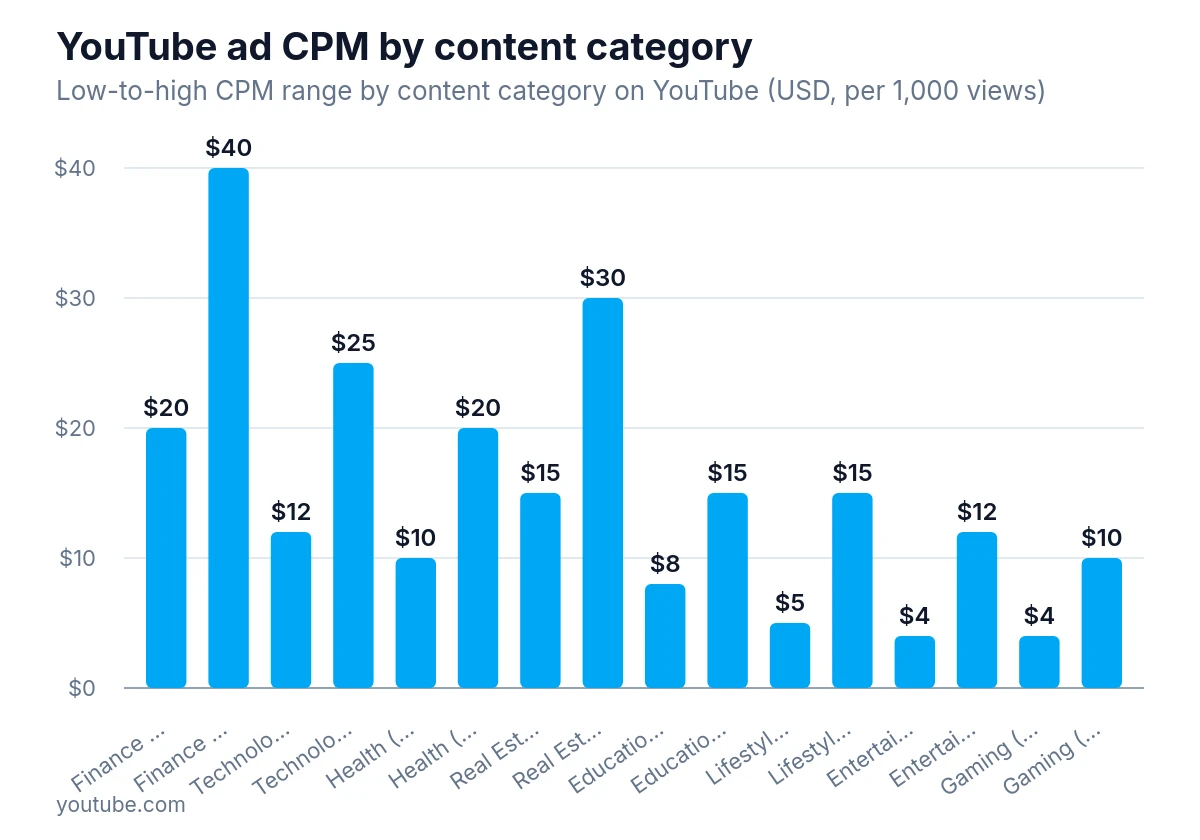
YouTube ads for finance pay the most — up to about $40 per 1,000 views — while general consumer categories like lifestyle, entertainment and gaming typically pay $15 or less.
This is not a guarantee. Ad rates depend on many factors, including advertiser demand, viewer location, and time of year. But giving the algorithm accurate, detailed information about your content is always better than leaving it to guess.
The same logic applies to brand safety. If your description is vague or contains language that could be misread as controversial, your video may be demonetized or limited. Clear, accurate descriptions reduce that risk.
Affiliate Revenue and the Description Field
If affiliate marketing is part of your monetization strategy, the description is your primary conversion tool. Most affiliate clicks on YouTube come from description links, not from pinned comments or end screens.
A few things that improve affiliate conversion from descriptions:
- Mention the product or tool in the video itself before directing viewers to the description. Viewers who already know what they are clicking are more likely to click.
- Use descriptive anchor text. "Best budget microphone I've tested" performs better than "Microphone link."
- Place your highest-priority affiliate links in the first few links of the section, not buried at the bottom.
- If you are promoting multiple products, consider grouping them by category so viewers can find what is relevant to them.
Always include your affiliate disclosure. The FTC's Endorsement Guides require material-connection disclosures to be clear and conspicuous whenever there is a relationship between an endorser and an advertiser that would not be obvious from context, and audiences that trust you convert better over time.
Channel Memberships, Patreon, and Direct Monetization Links
For creators who earn directly from their audience through memberships or crowdfunding, the description is an underused sales tool.
The key is context. A bare link to your Patreon does not convert well. A sentence or two explaining what members get, placed just above the link, converts much better.
Something like: "If you want early access to videos and monthly Q&A sessions, channel members get both. Link below."
That is 18 words. It takes five seconds to write and gives a viewer a reason to click. Most creators skip it entirely.
The same applies to email lists. If you are building a list, a brief description of what subscribers receive and how often you send will outperform a plain "Sign up for my newsletter" link every time.
Timestamps: Underrated for Both UX and SEO
Adding timestamps to your description does two things. First, it improves the viewing experience for longer videos by letting people jump to the sections they care about. Second, YouTube uses timestamps to generate chapter markers, which appear in search results as individual clickable segments.
Those chapter markers give your video more surface area in search results. Instead of one result, you effectively get multiple entry points, each labeled with a specific topic. A viewer searching for a specific subtopic within your broader video might find it through a chapter marker rather than the main result.
Format timestamps like this:
00:00 Introduction
01:45 Setting up your budget spreadsheet
04:30 Tracking variable income
08:15 Saving for taxes as a freelancer
12:00 Tools I recommend
Keep chapter titles short and descriptive. Use language your audience would search for, not internal shorthand.
Common Description Mistakes That Hurt Monetization
A few patterns consistently hold creators back.
Copying the title verbatim as the first line. This wastes the preview text and gives the algorithm no new information. Your description should add context, not repeat what the title already says.
Using the same description for every video. Some creators paste a generic channel description into every upload. This tells YouTube nothing about the specific video and misses every keyword opportunity.
Forgetting to update descriptions on older videos. If you have videos from two or three years ago that are still getting traffic, revisiting their descriptions can improve their performance without any new filming. Add updated links, better keywords, and timestamps if they are missing.
Putting links before content. Descriptions that open with a wall of links look spammy to both viewers and the algorithm. Lead with content, then links.
Ignoring the character limit. You have up to 5,000 characters. Most videos benefit from using at least 1,000 of them. A longer, well-written description gives the algorithm more to work with and gives viewers more reasons to take action.
Building a Description Template You Can Actually Use
The most practical thing you can do after reading this is build a template. A good template saves time and ensures you never skip the important elements.
Here is a basic structure to adapt:
[Opening sentence with primary keyword - 1 to 2 sentences, under 150 characters]

[Paragraph 1: What this video covers and who it is for]

[Paragraph 2: Key points, tools, or methods discussed]

CHAPTERS:
00:00 [Chapter title]
[Additional timestamps]

LINKS MENTIONED:
[Affiliate link 1 - with label]
[Affiliate link 2 - with label]

JOIN THE COMMUNITY:
[Membership or Patreon link with 1-sentence description]
[Email list link with 1-sentence description]

FIND ME HERE:
[Social links]

[Affiliate disclosure]
Fill this in for each video, swapping out the content-specific sections while keeping the structure consistent. Over time, you will get faster at it, and the quality will stay high because the framework is already in place.
Treating Descriptions as a Long-Term Asset
Every video you publish is a long-term asset. Some videos keep generating views and revenue for years. The description you write today will either help or hurt that video's performance for as long as it exists on the platform.
Creators who treat descriptions as a one-time afterthought miss the compounding benefit of well-optimized content. Creators who build a consistent, structured approach to descriptions end up with a library of videos that work harder over time, attract more search traffic, and convert more viewers into revenue.
The description box is not a formality. It is one of the few places on YouTube where you have direct control over how your content is found, understood, and monetized. Use it.