Step-by-Step Guide to Setting Up YouTube Memberships
What YouTube Memberships Actually Are
Most YouTube creators think about monetization in one dimension: ad revenue. Views come in, a fraction of a cent per view gets deposited, and the cycle repeats. The problem is that this model is entirely outside your control. Algorithm changes, advertiser pullbacks, and demonetization events can cut your income overnight.
YouTube Memberships work differently. Instead of earning from anonymous viewers, you earn a recurring monthly revenue stream from fans who actively choose to support you. They pay a fixed fee each month, you deliver exclusive perks, and that relationship continues until either side ends it.
This is not the same as a YouTube subscription. Subscribing to a channel is free and just means a viewer wants to see your content in their feed. A membership costs money and gives the member access to things non-members cannot get: exclusive videos, custom emoji, members-only community posts, badges that appear next to their name in your live chat, and whatever else you decide to offer. The distinction matters because creators sometimes confuse the two when setting up their channel strategy.
This guide walks through every step of enabling memberships, structuring your tiers, setting prices, and making the feature worth turning on in the first place.
Who Can Enable YouTube Memberships
Before spending time on setup, confirm you actually qualify. YouTube has a specific set of requirements, and missing any one of them means the feature simply will not appear in your Studio.
To be eligible, you need:
- At least 500 subscribers (this threshold was lowered from 1,000 in 2023 as part of YouTube's expanded monetization program)
- Your channel must be part of the YouTube Partner Program eligibility requirements, which now allow creators to join with as few as 500 subscribers
- You must be located in a country where memberships are available
- Your channel cannot be classified as made for kids
- You must be at least 18 years old
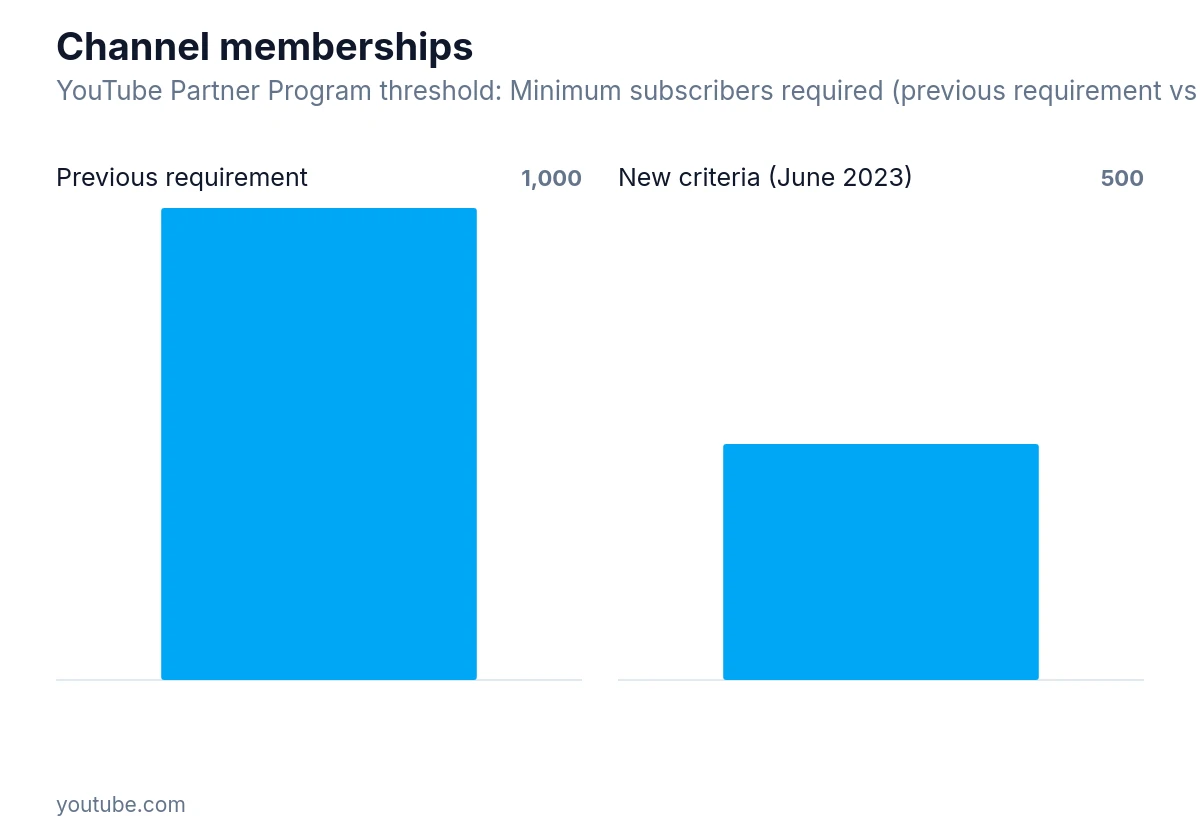
YouTube's Partner Program lowered the Channel Memberships subscriber requirement from 1,000 to 500 in June 2023.
The "made for kids" restriction is a hard block. If your channel is set to that status, either because you chose it or because YouTube classified it that way, memberships are unavailable regardless of your subscriber count. Channels focused on children's content cannot use this feature at all.
Joining the YouTube Partner Program itself requires meeting watch hour and subscriber thresholds, agreeing to YouTube's monetization policies, and connecting an AdSense account. If you have not done that yet, memberships are a secondary step that comes after.
Setting Up Memberships in YouTube Studio
Once you have confirmed eligibility, the setup process lives entirely inside YouTube Studio. Here is the full sequence.
Step 1: Open YouTube Studio
Go to studio.youtube.com and sign in with the Google account connected to your channel. From the left sidebar, click "Monetization."
Step 2: Find the Memberships Tab
Inside the Monetization section, you will see several tabs across the top: Overview, Memberships, Supers, and Shopping. Click "Memberships." If you meet all eligibility requirements, this tab will be active. If you do not, YouTube will display the specific requirement you are missing.
Step 3: Click "Set Up Memberships"
This opens the membership configuration panel. You will now build your tier structure before anything goes live.
Step 4: Configure Your Tiers
This is the most important part of the setup. YouTube allows up to five membership tiers, each with its own price and perk set. You are not required to use all five, and many creators do well with two or three.
For each tier, you set:
- A tier name
- A monthly price
- A list of perks
YouTube sets a minimum price per tier (currently around $0.99 per month for the lowest tier, though country-specific membership pricing means the exact amount varies by location and currency). You can set higher prices at each level. A common structure might look like this: a base tier at $1.99 per month with a loyalty badge and custom emoji, a mid tier at $4.99 with those perks plus early access to videos, and a top tier at $9.99 with all of the above plus monthly members-only live streams.
The prices are suggestions, not a formula. What you charge should reflect what you are actually offering. A creator who produces detailed tutorials might charge more at the base tier than a creator offering only a badge and emoji, because the perceived value is higher.
Step 5: Set Up Loyalty Badges
Badges are automatic. YouTube generates them for each tier and displays them next to a member's name whenever they comment or chat during a live stream. You can upload custom badge images (at least 32x32 pixels, PNG format) to replace the defaults. Custom badges are worth the extra few minutes because they make membership feel more personal and branded.
Step 6: Add Custom Emoji
Members-only emoji can be used in comments and live chat. You upload them as square images, and they appear in a special panel for members. Think of these as a small but visible signal of belonging. When other viewers see someone using an emoji they cannot access, it creates a mild incentive to join.
Step 7: Review and Publish
Before going live, YouTube shows you a preview of how your membership page will look to potential members. Check that your tier names make sense, your perks are clearly described, and your prices feel right. Once you click publish, the membership button appears on your channel page immediately.
Structuring Perks That People Actually Pay For
The most common mistake creators make is treating memberships as a tip jar with a badge attached. Viewers who pay monthly expect something in return, and "supporting the channel" is not a compelling enough reason on its own for most people.
The perks that tend to drive the most sign-ups fall into a few categories.
Exclusive content is the strongest driver. This means videos, posts, or live streams that non-members genuinely cannot access. Early access to public videos (where members see it 24-48 hours before everyone else) is a lighter version of this and easier to maintain. Full members-only videos require more production but create a clearer value proposition.
Community access works well for creators with engaged audiences. A members-only community post section where you share behind-the-scenes updates, ask for input on upcoming content, or just have more casual conversations gives members a sense of being inside the circle rather than watching from outside it.
Recognition matters more than most creators expect. Shoutouts in videos, names in credits, or a dedicated members-only live stream where you actually interact with the people paying you can be more valuable to members than any piece of content. People pay for access to the creator, not just the content.
Digital goods like wallpapers, preset packs, templates, or downloadable resources work well for creators in specific niches. A photographer offering Lightroom presets as a membership perk, or a writer offering monthly prompt packs, adds tangible value that justifies the monthly cost.
The key is to be honest with yourself about what you can sustain. Promising a monthly members-only video when you already struggle to post regularly will create a situation where your paying members are the first people to notice when you fall behind. Start with perks you can deliver consistently, then add more as your membership grows.
How YouTube Handles Payments and Revenue Split
YouTube takes a cut of membership revenue. Creators keep 70% of channel membership revenue after taxes and fees, with the platform retaining the remaining 30%. This is the same split used for Super Chats and Super Thanks.
The payout schedule runs monthly through AdSense, with finalized earnings from the previous month added to your account balance between the 7th and 12th. Members are charged on the anniversary of the day they joined, not on a fixed calendar date, so your membership income arrives as a rolling stream rather than a single monthly deposit.
YouTube handles all payment processing, currency conversion, and tax documentation. You do not need to set up any external payment system. This is one of the practical advantages of using YouTube's native membership feature over directing fans to third-party platforms, where you handle more of the infrastructure yourself.
If a member's payment fails (expired card, insufficient funds), YouTube attempts to retry the charge for three days, after which the membership enters a paused subscription state for 30 days until the member updates their payment information.
Promoting Your Memberships Without Being Annoying About It
Having memberships enabled does not mean viewers will find them. YouTube places a "Join" button on your channel page and below videos, but most viewers never notice it unless you point it out.
The most effective promotion happens inside your videos. A brief, specific mention works better than a generic "please support the channel" appeal. Something like: "If you want to see the extended version of this where I walk through the full process, that goes up for members tomorrow" is more compelling than "memberships help me keep making videos."
Live streams are particularly good for membership promotion because the badge system is visible in real time. When members' names appear with badges in chat, other viewers see it happening and the social proof is immediate. Many creators see a spike in membership sign-ups during or right after live streams.
Pinned community posts explaining what members get, and occasional posts that tease members-only content without fully revealing it, also help. The goal is to make non-members aware of what they are missing without making your public content feel like a constant sales pitch.
Is Enabling Memberships Worth It for Smaller Channels
This question comes up constantly, and the honest answer is: it depends on what you are willing to offer.
For channels under a few thousand subscribers, membership revenue will likely be modest. If ten people join at $4.99 per month, that is roughly $35 after YouTube's cut. That is not nothing, but it is not a meaningful income stream on its own.
What memberships do for smaller channels is create a core group of invested viewers. Members who pay monthly are more likely to comment, share, and watch new videos quickly, which helps with the signals YouTube uses to distribute content. The financial return is secondary to the relationship return at that stage.
For larger channels, memberships can become a significant and stable income source. Unlike ad revenue, which fluctuates with view counts and advertiser demand, membership income is predictable. A channel with several hundred members at various price points can count on a reliable monthly floor regardless of how any individual video performs.
The feature is worth enabling once you meet the requirements, even if you do not promote it heavily at first. The setup takes less than an hour, and having the option available means viewers who want to support you have a way to do so.
Managing Members After Launch
Once memberships are live, the work shifts to retention. Members who feel ignored or who stop receiving the perks they signed up for will cancel. YouTube does not notify you when someone cancels, so you will only see it in your membership analytics as a drop in active members.
Check your membership analytics monthly. YouTube Studio shows you total members, new members, cancellations, and revenue over time. If you see a pattern of cancellations after a specific date, think about what changed around that time. Did you stop posting members-only content? Did you miss a promised perk? The data often points to a specific gap.
Engage with your members directly. Reply to comments on members-only posts. Acknowledge members by name in live streams when it is practical. The creators who retain members longest are usually the ones who make members feel seen, not just processed.
You can also update your perks over time. If you add a new tier or change what an existing tier offers, existing members are grandfathered into their original price but you can add new perks for everyone. Removing perks from existing tiers is possible but risks cancellations, so do it carefully and communicate the change in advance.
Getting the Most Out of the Feature
YouTube Memberships work best when they are part of a broader relationship with your audience rather than a standalone monetization switch. The channels that build strong membership programs tend to share a few things: they are consistent, they deliver on what they promise, and they treat members as a community rather than a revenue line.
The setup itself is straightforward. The harder part is deciding what you genuinely have to offer and building a tier structure that reflects that honestly. Start simple, deliver reliably, and expand as you learn what your specific audience values. That approach will serve you better than launching five tiers on day one and scrambling to fill them.